Designing16 min read
Conversational User Interface: 2026 Guide for Business
Boost business growth with conversational user interface. Our 2026 guide: CUI types, design, use cases & implementation for SMEs & enterprises in India.
By the LitSpark Solutions team · Updated
- AI Automation
- Advertising
- Designing
- Development
- Digital Marketing
- MVP
- Resource Hiring
- Shoot
Your team already knows the pattern. Leads arrive after office hours, routine support queries pile up in WhatsApp and website chat, and the contact centre spends too much time answering the same basic questions. Product teams try to fix it with forms, FAQ pages, and ticketing workflows, but customers still want the fastest path: they want to ask a question in plain language and get to the next step quickly.
That's where a conversational user interface becomes more than a chatbot experiment. For Indian businesses, it's a practical operating layer for sales, support, onboarding, and service delivery. It can shorten the path between intent and action, but only if it's designed for how people communicate here: mixed languages, patchy networks, uneven digital literacy, and a strong preference for simple interactions over rigid screens.
Most guides stop at generic chatbot advice. That isn't enough. Indian SMEs and enterprises need a more grounded approach that accounts for multilingual use, low-bandwidth conditions, accessibility, and customer trust. The businesses that treat conversation as a product surface, not an add-on widget, usually make better decisions about automation, handoff, and customer experience.
Table of Contents
- Why Your Business Needs a Conversation Strategy
- What Is a Conversational User Interface
- The Business Case for Conversational Interfaces
- Designing Conversations That Convert and Retain
- Conversational UI in Action Real-World Success Stories
- Building Your Conversational UI A Practical Roadmap
- Your Next Step in Conversational Transformation
Why Your Business Needs a Conversation Strategy
A lot of businesses still think of chat as a support channel. That's too narrow. A conversation strategy decides how customers ask, how your systems respond, and how quickly people move from question to outcome.
That matters because conversational user interfaces have emerged as the dominant interface in major industries including e-commerce, healthcare, and finances, with users citing speed as the primary advantage over traditional graphical interfaces, according to NN Group findings discussed in this overview of conversational interfaces. In plain terms, people often finish tasks faster when they can type or speak what they want instead of hunting through menus.
For a product manager, the implication is simple. Every repeated question, abandoned lead, or delayed response is a workflow problem. A good conversational layer can absorb simple requests, route complex ones, and reduce the interaction cost for the user.
The hidden cost of no conversation layer
When a customer asks, “Where is my order?”, “Can I reschedule?”, or “Do you deliver in my area?”, they don't want to click through five screens. They want one answer and one next step.
A weak setup usually creates these problems:
- After-hours drop-off: Buyers reach out when staff aren't available, then disappear before the next business day.
- Support overload: Human agents spend time on repetitive queries instead of exceptions that need judgement.
- Fragmented journeys: Website, app, WhatsApp, and call flows all answer differently.
- Slow qualification: Sales teams chase leads that could've been pre-screened automatically.
Practical rule: If a customer asks the same question every day, that question belongs in a well-designed conversational flow.
Why this matters in 2026
The shift isn't about replacing apps or websites. It's about adding a faster front door. For many tasks, conversation is the shortest route between intent and completion.
That's why a business needs a strategy, not just a widget. Without one, teams automate the wrong tasks, choose the wrong channels, and frustrate users with robotic flows. With one, they create a system that saves staff time, improves responsiveness, and makes digital journeys feel easier.
What Is a Conversational User Interface
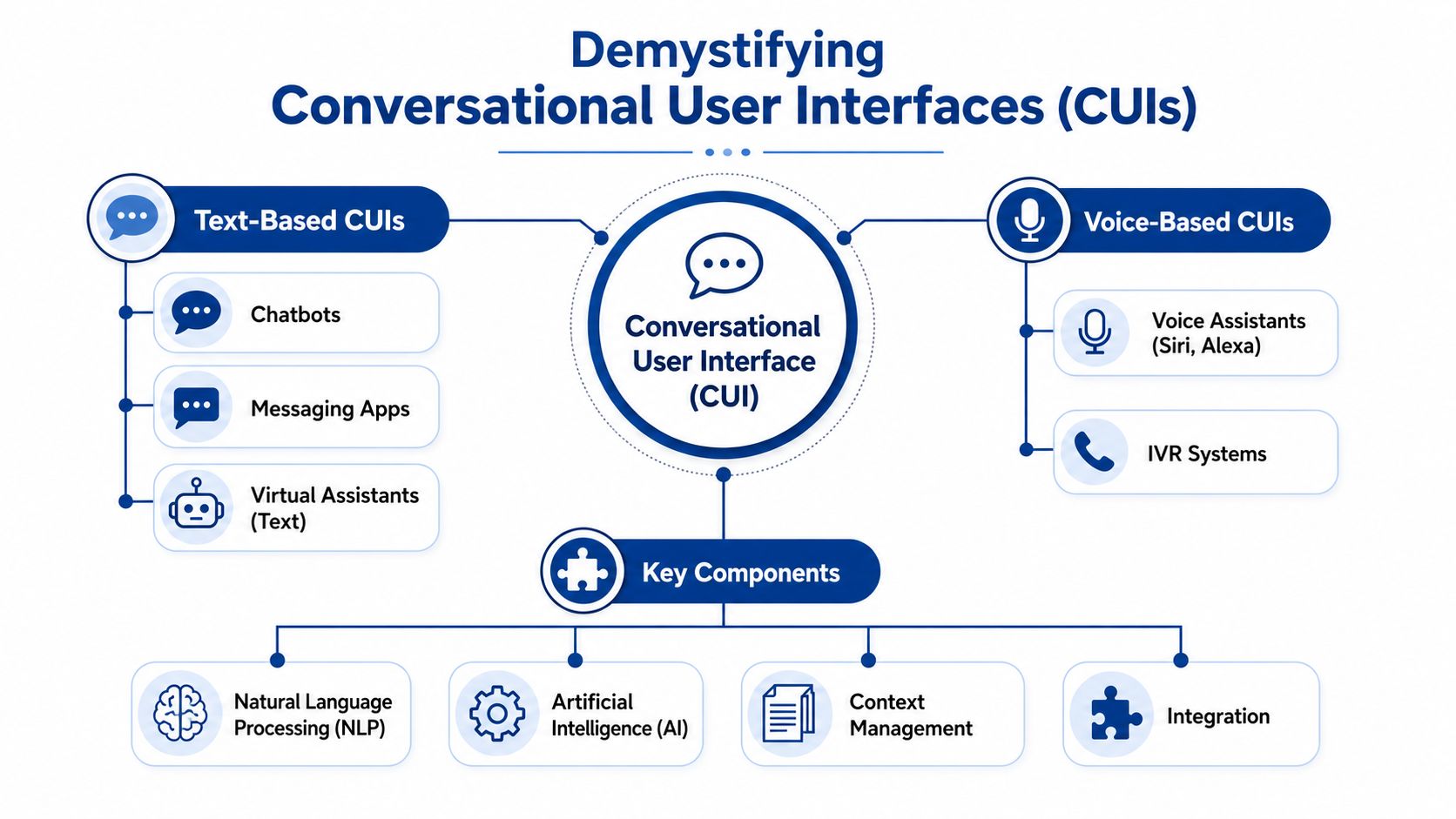
A conversational user interface is a system that lets people interact with software through natural language. That interaction might happen in text, voice, or a mix of both. Instead of clicking through fixed screens, the user says what they want and the system guides them to the result.
The easiest analogy is this: a graphical interface is like filling out a form at a counter. A conversational interface is like talking to a helpful clerk who asks the next relevant question.
From forms and menus to dialogue
Early systems were rigid. Users had to know the exact words or commands. That made software feel unforgiving. Modern systems are better because they try to understand intent, not just exact phrasing.
The historical shift matters here. The history of conversational user interfaces at Objectway explains that the third generation of CUIs evolved from the established habits of billions of users messaging each other online. This hybrid model combines chat, voice, or natural language with graphical elements like buttons and menus, instead of forcing users to memorise commands.
That hybrid design is what many product teams miss. A strong CUI isn't pure chat. It often uses:
- Short text prompts for clarity
- Buttons and quick replies for speed
- Images or cards for choice-heavy tasks
- Forms only when structure is necessary
If you want a useful companion piece on the technology behind this behaviour, Halo AI's guide to understanding conversational AI is a solid reference.
The main types of CUI
Not every conversational interface works the same way. The right model depends on the risk, complexity, and variability of the task.
| Type | Best for | Limitation |
|---|---|---|
| Rule-based bot | Fixed FAQs, basic routing, simple policy checks | Breaks when users phrase things unexpectedly |
| AI-driven assistant | Intent detection, flexible queries, richer support journeys | Needs training, testing, and stronger governance |
| Hybrid conversational UI | Most business cases, because it blends language with buttons and workflows | Requires more thoughtful UX design |
A few concrete examples make this easier to map:
- Text-based CUI: A D2C skincare brand on WhatsApp helps users track orders, browse product categories, and request returns.
- Voice-based CUI: A hospital phone system lets callers book or change appointments without waiting for reception.
- Hybrid CUI: A banking app uses chat for questions but shows secure buttons and confirmation screens for sensitive actions.
Good conversational design doesn't ask users to type everything. It removes effort wherever the system already knows the likely next step.
When product managers get confused, it's usually because “chatbot” sounds smaller than it is. A conversational user interface isn't just a bot persona. It's a user experience pattern that connects language, decision logic, and business systems into one usable flow.
The Business Case for Conversational Interfaces
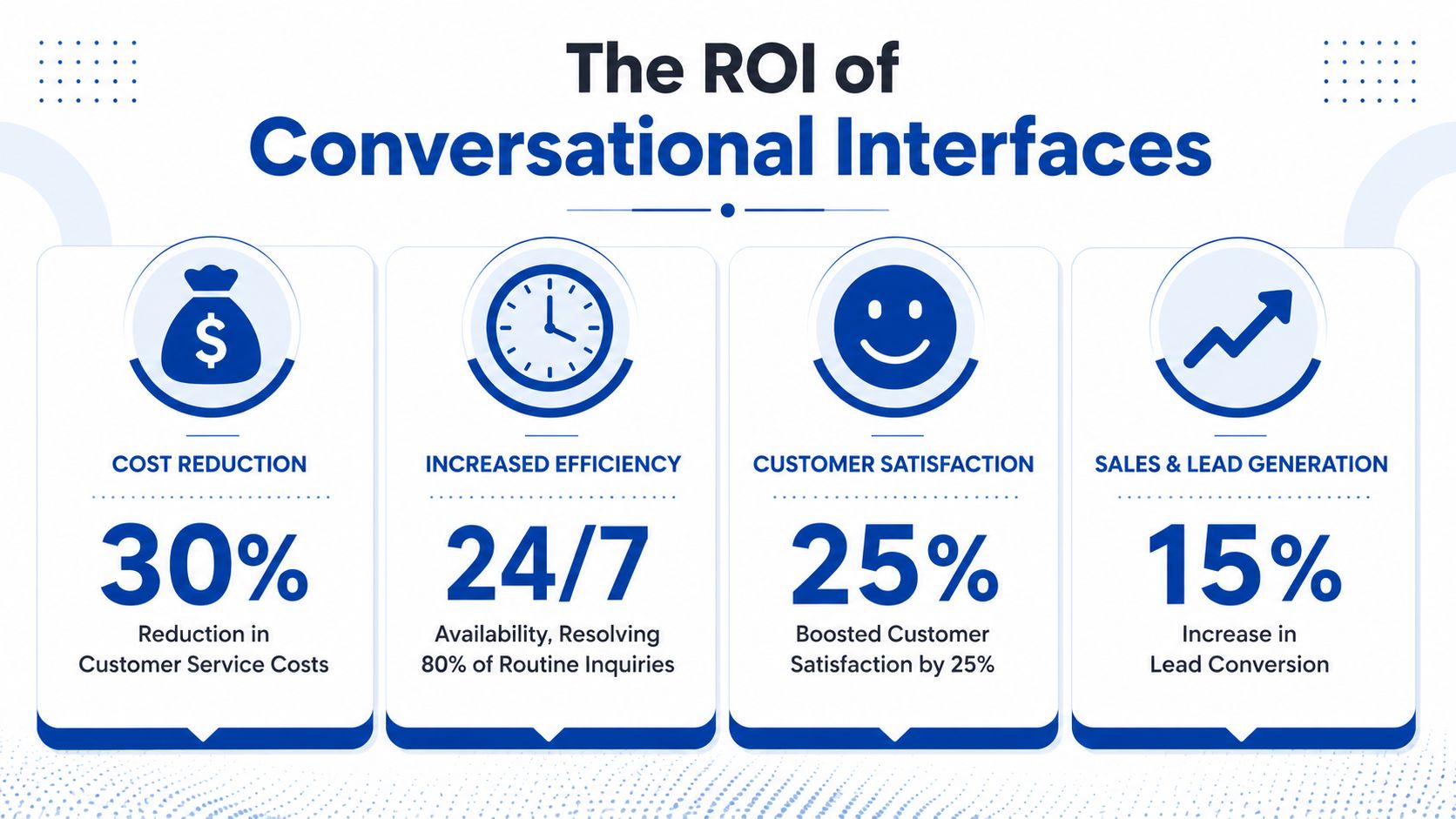
The commercial case for a conversational interface isn't that it feels modern. It's that it can reduce friction in moments that directly affect revenue, service quality, and operating efficiency.
That value appears in two places. First, customers reach outcomes with less effort. Second, teams spend less time handling repeatable work manually.
Why engagement matters commercially
Engagement isn't a vanity metric when it helps people complete tasks, remember information, and stay oriented in the journey. In learning-focused settings, experimental results on conversational interfaces found that implementing them significantly improves user engagement, augments long-term memorability of information, and alleviates user cognitive load compared to traditional web interfaces.
For a business, that translates into practical outcomes:
- Lower cognitive load means fewer users feel stuck and abandon the task.
- Better memorability helps during onboarding, product education, and repeat actions.
- Higher engagement gives support, sales, and service flows more room to guide the next step.
A product manager should read that as a design advantage. If users can understand and remember the interaction better, they're more likely to complete the flow without escalation.
Where businesses usually see value first
Smaller businesses often get the fastest wins from narrow use cases. Enterprises usually benefit most when they connect conversation to internal systems and governance.
Here's how that tends to look in practice:
- For startups and SMEs: lead capture on landing pages, order tracking, appointment booking, qualification before a sales callback, and always-on FAQ handling.
- For mid-market service businesses: customer support triage, renewal reminders, onboarding assistance, and collections or payment support.
- For enterprises: HR self-service, IT helpdesk routing, policy guidance, employee onboarding, and high-volume customer operations.
A useful mental model is this. Don't ask, “Where can we use AI?” Ask, “Where are people repeating the same intent in different words?”
A simple ROI lens for product teams
You don't need a huge transformation programme to justify a conversational layer. You need a clear operational equation.
Identify repetitive demand
Look at support logs, inbound chats, call reasons, and common sales questions.Map the task to a business outcome
Does the flow reduce response time, increase lead quality, improve completion, or reduce manual workload?Check system dependencies
A polished front-end conversation still fails if it can't fetch order status, schedule appointments, or create tickets.Choose a realistic scope
One high-volume use case with strong integrations usually outperforms a broad but shallow bot rollout.
Teams that need implementation support often start with automation around service and operations. A practical reference point is this overview of business automation services, which shows the sort of backend workflows that make a conversational layer useful instead of cosmetic.
Commercial test: If the conversation can save staff time and move the user to a clear next step, it has business value. If it only greets people and dumps them into a contact form, it doesn't.
A conversational user interface earns its keep when it handles real work. That means reducing unnecessary effort for the customer and unnecessary repetition for the team.
Designing Conversations That Convert and Retain
A poor bot doesn't simply fail. It creates mistrust. Users stop asking, agents inherit angry escalations, and the business concludes that “chat doesn't work” when the underlying issue is design.
The strongest conversational experiences feel structured without feeling restrictive. They guide, clarify, and recover gracefully when the user says something unexpected.
The three rules that keep conversations usable
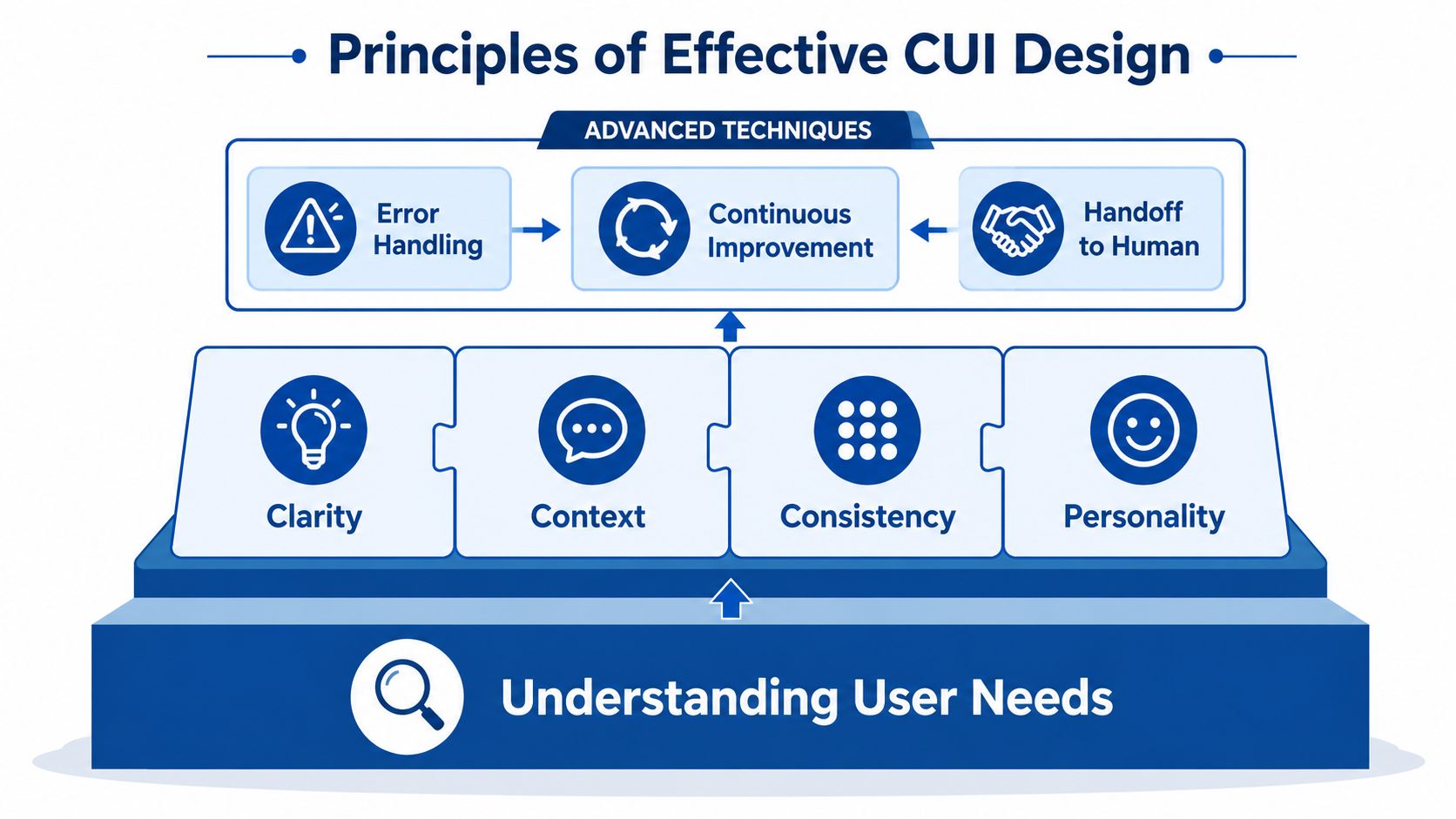
The Landbot explanation of conversational design identifies three main pillars that make CUIs effective: the Cooperative Principle, Turn-taking, and Context.
These sound theoretical, but they're practical.
- Cooperative Principle means the system should help the user move forward. It shouldn't show off, over-explain, or ask for information it doesn't need.
- Turn-taking means the user gets room to respond. Long walls of bot text feel like a lecture, not a conversation.
- Context means the system should adapt to what the user is trying to do, and sometimes how they're likely feeling. A refund query and a first-time product enquiry shouldn't sound the same.
What Indian businesses need to design for
Many global CUI playbooks assume users are comfortable typing, fluent in English, and using stable devices on stable networks. That assumption breaks quickly in India.
A LinkedIn summary highlighting literacy and AI adoption in India points to a neglected issue: 26% of India's adult population remains illiterate or has very low literacy. That changes interface design immediately. Typed chat alone won't work for everyone, and voice alone won't solve the problem if accent or dialect handling is weak.
Design responses that usually work better in this context include:
- Voice-first entry points: especially for service requests where typing is a barrier
- Icon-supported choices: simple visual prompts for common intents
- Short, plain-language prompts: one idea per turn
- Guided options: quick replies in English and regional language combinations
- Confirmation steps: repeat critical details before executing actions
Accessibility and device constraints matter too. The Dragonscale discussion of inclusive conversational interfaces in India notes that 30% of users rely on devices with less than 2GB RAM, 40% experience intermittent connectivity, and 15% use assistive tools like screen readers. That makes heavy interfaces risky.
A practical design checklist for Indian deployments:
- Keep payloads light: avoid bloated media and over-designed chat shells
- Support keyboard navigation: especially for users relying on assistive tools
- Use captions and alt text where relevant: accessibility can't be an afterthought
- Design for interrupted sessions: let users return without losing progress
If your bot only works on fast phones, full literacy, and perfect English, it isn't ready for India at scale.
How to recover when the bot gets it wrong
Failure handling is where good conversational products separate themselves from demo bots.
When the system misreads intent, the worst move is to reply with “I didn't understand” and end the flow. Better systems narrow the path. They apologise briefly, offer options, and ask a clarifying question.
For example:
| Weak response | Better response |
|---|---|
| “Sorry, I didn't get that.” | “Sorry, I missed that. Did you want order tracking, cancellation, or delivery help?” |
| “Please rephrase.” | “I can help with returns, payments, or product details. Which one fits best?” |
| “Invalid input.” | “That didn't match what I expected. You can type your order number or choose Help from the menu.” |
A strong conversational user interface doesn't pretend it never fails. It makes recovery feel easy, keeps the user oriented, and offers a human handoff where the risk or emotion level is high.
Conversational UI in Action Real-World Success Stories
Abstract advice only goes so far. Product managers usually need to picture where a conversational layer fits into a real operation, which team benefits first, and what decisions make the difference between utility and noise.
Three patterns show up repeatedly.
E-commerce support that reduces buying friction
An online retail business often has a simple but expensive problem: too many pre-purchase and post-purchase questions, spread across site chat, Instagram, WhatsApp, and email.
A conversational interface works well here when it focuses on intent clusters instead of generic small talk. One flow handles “Where is my order?”, another covers “Which product should I choose?”, and another resolves “How do I return this?” The useful design choice isn't a witty bot persona. It's tight integration with catalogue, order, and policy systems.
The result is operationally meaningful. Customer support agents stop spending their day on status checks, and buyers get answers while they're still in decision mode.
Healthcare booking with privacy and reassurance
Healthcare teams need a different tone. Patients aren't just looking for efficiency. They also want clarity, reassurance, and a sense that they won't make a mistake.
A good healthcare CUI usually limits scope at first. It might help with doctor discovery, appointment booking, rescheduling, and clinic directions. It avoids overreaching into unsupported medical advice. That boundary builds trust.
The effective design choice here is sequencing. The bot asks only for what's needed, confirms details before submission, and gives a clear path to a human when the request becomes sensitive or emotionally charged.
In healthcare, the best conversational flow often feels calm and boring. That's a strength, not a weakness.
Internal HR assistance that scales operations
Inside enterprises, HR teams often field repetitive questions from employees: leave policy, document submission, onboarding steps, benefits, and payroll timing.
A conversational assistant can centralise this experience. New hires get guided through joining steps, existing employees find answers faster, and HR staff spend more time on exceptions rather than policy repetition. When integrated properly, the assistant can also route unresolved issues into service desks instead of leaving people stranded.
For teams evaluating delivery models, it helps to review examples of how different digital builds come together in practice. A portfolio of web, app, automation, and product work can be useful when benchmarking what level of integration and UX maturity your own deployment might need.
The common thread in all three stories is restraint. Each conversational user interface succeeds because it does a few jobs clearly, connects to the right systems, and respects the user's situation.
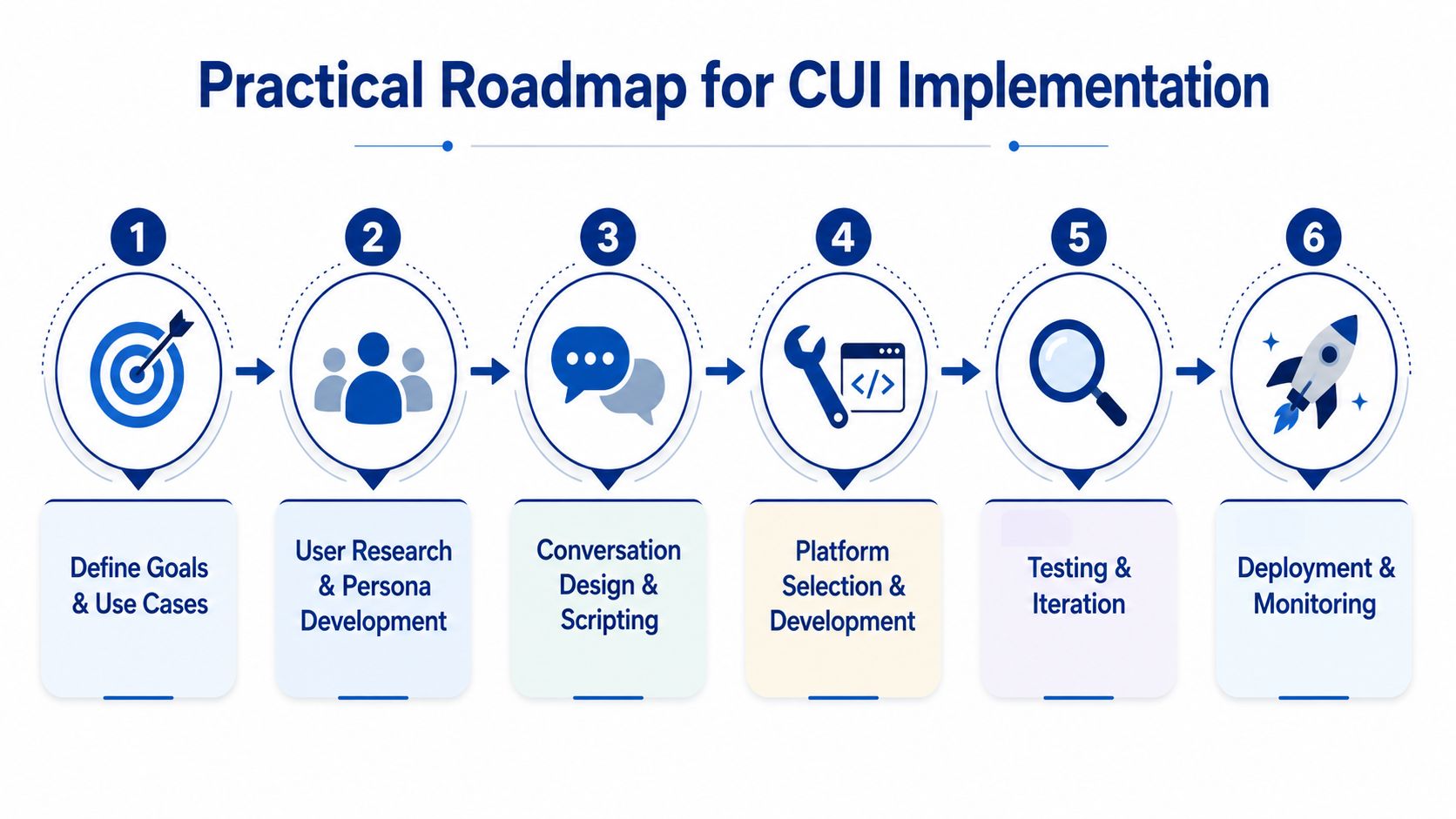
Building Your Conversational UI A Practical Roadmap
Most CUI projects fail for ordinary reasons. The scope is too wide, the backend integration is weak, the language model is expected to guess too much, or nobody plans for security and error recovery.
A better rollout is boring in the best way. It starts with one high-value use case, tests it under real conditions, and expands only after the flow works reliably.
Start with one job, not ten
The first release should solve a narrow problem that has clear demand and clear business ownership. Order tracking, appointment scheduling, claims status, employee leave queries, or lead qualification are all better starting points than “general customer support”.
Use this filter before you commit:
- Volume: Does this request happen often?
- Clarity: Is the desired outcome easy to define?
- Integration: Can the system access the required data or actions?
- Risk: Can mistakes be contained and corrected?
- Fallback: Is there a human path when needed?
That framing keeps the team focused on task completion instead of bot novelty.
Choose the right build path
The technology decision should follow the use case, not the other way around.
A few common paths:
- SaaS platforms such as Dialogflow: good for faster starts, common intents, and structured flows
- Open-source frameworks such as Rasa: useful when teams want more control over models, routing, or deployment
- Custom builds: appropriate when the business needs deeper integration, stronger governance, or channel-specific orchestration across app, web, voice, and messaging
For teams that want a technical primer before making architecture choices, AgentStack's guide on how to build a robust AI chatbot is a helpful companion read.
The important point is this. The UI layer, NLP layer, business logic, and analytics layer should be treated as separate decisions. Many teams buy a chatbot tool and then discover it can't cleanly support their workflow, handoff rules, or compliance constraints.
Security, language, and failure handling
Indian businesses need to be especially disciplined. The UXMatters practical principles for modern AI systems highlight several points that should directly influence your roadmap.
First, high-security CUIs integrate multi-layered authentication to prevent fraud. For sensitive actions, the article specifies a combination of MFA, biometric identity verification, and end-to-end encryption. It also notes that back-end systems with frequent vulnerability assessment and strict data-retention limits can mitigate the risk of data breaches by at least 40% compared to standard non-secure chat implementations.
Second, language support can't be treated as a cosmetic localisation task. In the Indian market, failure to configure the NLU component to support multi-language dialects dynamically results in a 30% increase in user error rates. That means Hinglish or regional-language switching isn't edge-case behaviour. It's mainstream behaviour.
Third, recovery design has measurable impact. CUIs that provide brief apologies followed by a practical next step and clarifying questions recover 85% of failed interactions. That single insight should influence your script templates, retry logic, and escalation rules.
A build checklist that reflects those realities looks like this:
- Protect sensitive actions: use layered authentication for payments, policy changes, account access, and personal data updates
- Design for code-switching: train intent handling for mixed-language input, not just pure English or pure regional language
- Script recovery paths: every critical intent should have at least one clarification route
- Limit data retention: keep only what the workflow requires
- Plan human escalation: especially for fraud risk, medical sensitivity, or emotionally charged complaints
Implementation advice: The best bot scripts don't sound smart. They sound clear, safe, and easy to recover from.
If you're mapping a production-grade rollout with custom workflow and system integration, this overview of AI automation development services reflects the kind of backend and product engineering work these deployments usually require.
What to measure after launch
Many teams track only message counts. That won't tell you whether the system is useful.
Instead, measure the things that show whether the conversational user interface is doing real work:
| Metric | What it tells you |
|---|---|
| Task completion rate | Whether users actually finish the intended action |
| Containment rate | How often the bot resolves the issue without human intervention |
| Escalation quality | Whether handoffs happen at the right moment with enough context |
| User satisfaction signals | Whether people feel the exchange was useful and low-friction |
| Drop-off points | Where flows become confusing, demanding, or technically brittle |
Review transcripts regularly. Product managers often learn more from failed conversations than successful ones. Repeated confusion usually points to one of four issues: poor intent design, weak wording, missing integrations, or an unrealistic assumption about user behaviour.
The roadmap isn't complicated. Pick one task, integrate thoroughly, secure it properly, support real language behaviour, and refine based on live usage.
Your Next Step in Conversational Transformation
A conversational user interface isn't a layer you sprinkle on top of a product. It's a decision about how your business wants people to get things done. When it works, customers move faster, teams handle less repetitive work, and digital journeys feel less like administration and more like service.
That's why the strongest implementations combine product thinking, UX writing, system integration, analytics, security, and localisation. The interface may look simple on the surface, but the outcome depends on a well-orchestrated backend and a realistic view of user behaviour.
For Indian businesses, the opportunity is bigger because the need is sharper. Multilingual communication, mixed literacy levels, accessibility requirements, and unstable connectivity all make rigid interfaces more fragile. A well-designed conversational layer can absorb that complexity and present something simpler to the user.
The key is to stay disciplined. Start with one valuable use case. Build around real customer intent. Make recovery easy. Secure sensitive actions. Measure what the system resolves. Businesses that follow that path usually end up with something much more useful than a chatbot. They build a reliable conversation channel that supports growth.
If you're exploring how to turn these ideas into a working product, LitSpark Solutions Private Limited can help you shape the roadmap. Their team combines AI automation, full-stack product development, UX design, and growth execution, which is exactly the mix most conversational projects need to move from concept to dependable business system.
- conversational user interface
- chatbot design
- voice ui
- ai for business
- customer engagement