Development19 min read
Database Architecture Design: Master Modern Concepts
Master modern database architecture design. Explore core concepts, patterns, cloud options, & build scalable systems with our expert guide.
By the LitSpark Solutions team · Updated
- AI Automation
- Advertising
- Designing
- Development
- Digital Marketing
- MVP
- Resource Hiring
- Shoot
Your product probably worked well with the first few hundred users. Pages loaded fast, reports refreshed quickly, and the team barely thought about the database. Then growth arrived. Checkout started hanging at busy hours. Customer support began hearing “payment failed” even when money was debited. Dashboards took so long that people exported CSVs and worked offline.
That pattern is common because engineering teams don't hit their limit in the application layer first. They hit it in the data layer. The schema that felt “good enough” early on starts creating expensive joins, lock contention, duplicate data, slow writes, and painful fixes. By the time a founder notices, cloud bills are climbing and engineers are spending release cycles on firefighting instead of shipping features.
For Indian businesses, the critical considerations surpass mere speed. You also need to think about data residency, cloud portability, operational simplicity, and how to stay compliant without turning every release into a legal review. Good database architecture design isn't just a technical exercise. It's how you protect margins, keep the product responsive, and avoid rebuilding the core of your system when the business should be accelerating.
Table of Contents
- Why Your App Is Slow and What to Do About It
- The Bedrock Concepts of Database Design
- Understanding the Core Architectural Trade-offs
- Modern Database Architectural Patterns
- Choosing Your Database on the Cloud
- Performance Security and Compliance by Design
- Practical Blueprints for Startups SMEs and Enterprises
- Frequently Asked Database Architecture Questions
Why Your App Is Slow and What to Do About It
A founder usually notices database trouble through symptoms, not root cause. The app is “slow”. Search works in staging but stalls in production. Campaign traffic lands well, then the product buckles when many users hit the same hot tables. Engineers add more CPU, then more memory, then a bigger database tier. The app feels slightly better for a while, and the bill gets worse.
In many teams, the core issue is weak database architecture design. Tables grew without clear boundaries. Indexes were added reactively. Reporting queries share the same primary database as live transactions. Customer, order, event, and notification data got mixed into a layout that made sense for a sprint, not for a business.
The operational cost of getting this wrong is visible in India's startup ecosystem. A 2023 study by the Indian Institute of Technology Madras found that 72% of Indian startups failed to meet scalability targets due to poor database architecture design, leading to an average 35% increase in server resource consumption and 50% higher cloud costs (IIT Madras study reference). That is not a small tuning issue. That is product velocity, margin, and runway getting eaten by preventable design debt.
What slow usually means underneath
When an app slows down, one of these is usually happening:
- Queries are scanning too much data: Missing or badly chosen indexes force the database to work harder than needed.
- One database is doing every job: Transactions, admin reports, exports, and analytics all compete for the same resources.
- The schema reflects features, not business entities: Quick additions create duplicate fields, inconsistent relationships, and brittle joins.
- Hot reads keep hammering the primary node: Teams skip caching, then wonder why common pages crush the write path.
Practical rule: If scaling means only buying a larger instance, you probably have an architecture problem before you have a traffic problem.
Monitoring changes how quickly you find the truth. Instead of debating whether the issue sits in code, infra, or SQL, use a proper SQL observability workflow. A tool like the Fivenines platform for SQL monitoring helps teams see blocking, expensive queries, and unhealthy resource patterns before they turn into outages.
The other trap is building a fast interface on top of a weak data model. Good frontend work can hide database flaws for a while, especially in early products, but not for long. If you're building customer-facing products, custom web development for growing digital products only pays off fully when the underlying data layer can support fast reads, reliable writes, and predictable scaling.
What to fix first
Start with the path that affects money or trust first. For an e-commerce app, that's checkout and inventory. For a SaaS tool, it's login, account state, billing, and the dashboards customers use every day.
Then do three things in order:
- Identify the slowest business-critical queries.
- Map them back to schema, indexing, and data access patterns.
- Separate operational traffic from analytical or background workloads where possible.
A radical rebuild is rarely necessary from the outset. Rather, the focus should be on achieving a cleaner design, better boundaries, and fewer accidental bottlenecks.
The Bedrock Concepts of Database Design
If database architecture design feels abstract, use a simpler mental model. Think about a warehouse. You can store everything in a single open area and let workers search manually, or you can organise shelves, labels, aisles, and picking rules so that common tasks stay fast and errors stay low.
Databases work the same way. A good design makes common operations easy and mistakes rare. A weak design turns every future feature into a scavenger hunt.
Think like a warehouse manager
SQL databases such as PostgreSQL and MySQL work best when your data has clear structure and relationships. Orders belong to customers. Payments relate to orders. Inventory changes map to products and locations. These systems are strong when correctness matters and relationships are central.
NoSQL databases such as MongoDB and Cassandra are useful when the data shape changes often, when write volume is unusually high, or when the system benefits from flexible documents or distributed storage patterns.
Here's a practical comparison.
| Characteristic | SQL (e.g., PostgreSQL, MySQL) | NoSQL (e.g., MongoDB, Cassandra) |
|---|---|---|
| Best fit | Structured business data and transactions | Flexible data models and certain high-write workloads |
| Schema style | Defined tables and relationships | Flexible or document-oriented structures |
| Data integrity | Strong integrity controls and relational constraints | More application-managed consistency in many use cases |
| Typical use | Orders, billing, inventory, finance | User profiles, event data, content feeds, large-scale write streams |
| Change management | More deliberate schema evolution | Faster iteration for evolving record shapes |
| Trade-off | Strong correctness, but joins and scale need care | Flexible scaling, but data discipline can drift |
A lot of founders ask which one is “better”. That's the wrong question. The right question is what kind of failure hurts your business more. If a payment record is wrong, SQL is usually the better fit. If a fast-changing content feed needs to ingest large volumes of varied records, NoSQL may be the better fit for that slice of the system.
For founders making broader platform choices, this same thinking shows up at the application level too. The discussion in this guide to effective software architecture for SaaS founders is useful because database choices only work well when they match service boundaries and product goals.
Normalise first, then break the rules carefully
Normalization means storing each fact in the right place once, instead of duplicating it everywhere. In practice, that reduces update mistakes and keeps the model easier to maintain. If customer addresses sit in five different tables, your team will eventually update four and miss one.
A simple starting point:
- First Normal Form: Keep fields atomic. Don't store comma-separated lists in one column.
- Second Normal Form: Make sure non-key fields depend on the full key.
- Third Normal Form: Remove indirect dependencies so facts live with their true owner.
You don't normalise because textbooks say so. You normalise because duplication gets expensive. It creates support issues, reporting mismatches, and migration pain.
A clean schema is cheaper to change than a clever one.
That said, pure normalisation isn't the finish line. Systems with heavy reads sometimes need denormalization, where you duplicate selected data to reduce joins and speed up common queries. That can be the right move, but only after you know exactly which queries are slow and why. Doing it too early creates write complexity and consistency problems.
The practical sequence is simple. Start clean. Measure. Then optimise only where the product needs speed.
Understanding the Core Architectural Trade-offs
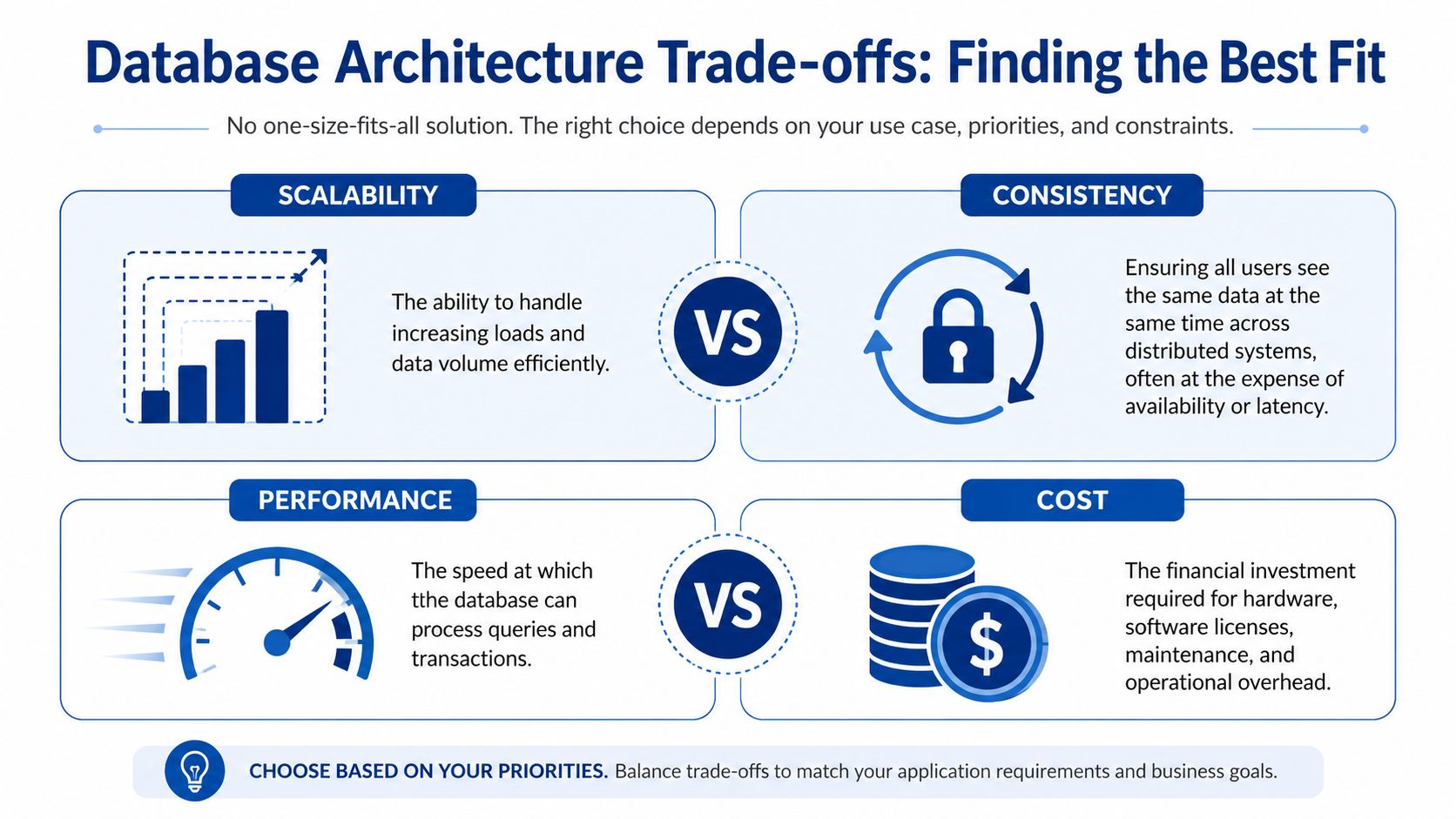
There is no universally best database architecture design. There is only the design that matches your failure tolerance, user expectations, and operating budget. Founders often want an architecture that is fast, cheap, consistent, always available, easy to maintain, and simple to scale. Real systems make trade-offs.
The easiest way to understand those trade-offs is to compare two products. A banking app cannot show one balance to you and a different balance to the ledger. A social feed can tolerate a slight delay before everyone sees the same like count. Both systems need sound engineering, but not the same priorities.
A visual comparison makes these tensions easier to evaluate.
Consistency and availability serve different businesses
The CAP theorem is often explained academically. For product teams, the useful version is simpler. In distributed systems, when network partitions happen, you often have to lean toward consistency or availability.
Consider these two examples:
- Checkout and payments: If a user pays, the system must record the order, payment, and inventory state correctly. You usually favour consistency.
- Feeds and counters: If a user likes a post, a slight delay before every region reflects the same number is often acceptable. You usually favour availability.
This isn't theory. It affects user trust and support load. If your cart shows stock that no longer exists, customers blame the brand. If your social graph takes a moment to refresh, most users keep scrolling.
Choose the failure you can explain to customers. Then design for it deliberately.
ACID and BASE are product decisions
ACID stands for atomicity, consistency, isolation, and durability. It fits systems where transactions must behave predictably. Billing, ledger updates, entitlement changes, and order finalisation usually belong here.
BASE points toward basically available, soft state, and eventual consistency. It fits workloads where scale and availability matter more than immediate global agreement.
Here is the practical difference:
| Situation | ACID-leaning choice | BASE-leaning choice |
|---|---|---|
| Payment capture | Prefer strict transaction guarantees | Usually a bad fit |
| Inventory reservation | Strong fit when overselling is costly | Risky if consistency gaps hurt revenue |
| User activity feed | Often unnecessary overhead | Usually a strong fit |
| Analytics event stream | Can become expensive and rigid | Often better suited |
A mistake I see often is teams applying one rule to everything. They either push all data into one relational core, which slows growth, or swing too far into flexible distributed models and then struggle with correctness in commercial workflows.
A better pattern is selective architecture. Keep the transaction core strict. Loosen the edges where the product can tolerate delay. That approach usually gives better performance without sacrificing business integrity.
Modern Database Architectural Patterns
Patterns matter when simple fixes stop working. You can add indexes, tune queries, and raise instance sizes for quite a while. Eventually, though, the shape of the system becomes the limiter. That's when architecture patterns stop being “advanced topics” and start becoming practical tools.
The most important shift is this. Architecture patterns are not status symbols. They are ways to isolate risk, reduce load, and keep teams moving without forcing one database to carry every workload.
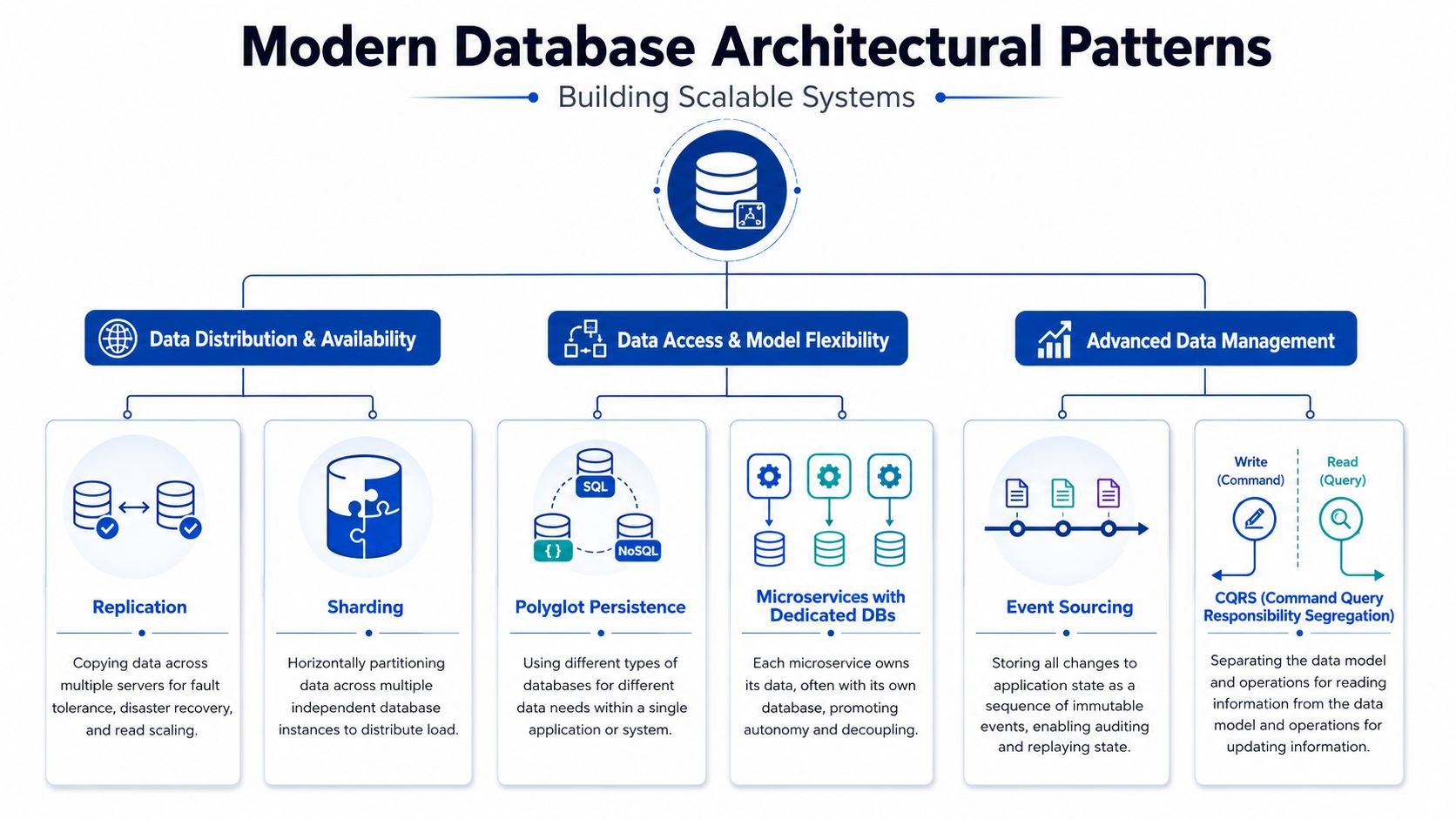
Early in this stage, visual models help teams align on what each pattern does.
Monoliths and microservices change data boundaries
A monolith with one main database isn't bad. For many startups, it's the right starting point because it is easier to ship, easier to debug, and easier to staff. Trouble starts when the database schema becomes a shared junk drawer for every module.
A microservices approach changes that by giving services clearer ownership of data. Orders own order state. Catalog owns product metadata. Identity owns user credentials and access. That separation improves autonomy, but it also introduces distributed complexity, cross-service coordination, and harder reporting.
Use service-level database separation when one or more of these become true:
- Release collisions keep happening: One team's schema change breaks another team's workflow.
- Workloads differ sharply: Search, checkout, and analytics have very different access patterns.
- Operational blast radius is too large: A report query or import job can impact the entire product.
Patterns that solve real scaling problems
Replication is the first pattern many teams adopt. You keep one primary database for writes and use replicas for reads, backups, or recovery. This improves read capacity and resilience, but replicas don't fix poor queries. They only spread load more sensibly.
Sharding is different. It splits data across independent database instances. The phonebook analogy works well. If one giant volume becomes slow and unwieldy, splitting it into sections makes retrieval faster and operational load easier to distribute. Sharding helps when a single node becomes the bottleneck for size, throughput, or locality.
The next patterns serve more specialised needs:
- CQRS: Separate write models from read models. This is useful when the app needs simple, fast operational writes but also rich dashboards or search views that would slow the transactional path.
- Event sourcing: Store state changes as a sequence of events rather than only the latest row state. This is valuable when auditability matters and when you need to reconstruct how the system reached a given state.
- Polyglot persistence: Use different databases for different jobs. PostgreSQL for transactions, MongoDB for flexible content, Cassandra for specific high-write cases, for example.
The embedded walkthrough below gives a useful visual primer before teams implement these patterns in production.
What doesn't work is adopting these patterns because they sound modern. CQRS adds operational overhead. Event sourcing increases modelling complexity. Sharding complicates keys, queries, and migrations. They pay off only when they solve a defined business problem, such as heavy read reporting, regional isolation, or a strict audit requirement.
Choosing Your Database on the Cloud
For most Indian startups and SMEs, the first major platform decision isn't whether to run databases on-premise or in the cloud. That decision has mostly already been made. The main question is which managed path gives you enough control without pulling your engineers into infrastructure work all week.
That shift has been substantial. In India, over 65% of enterprises moved from on-premise databases to cloud-native solutions like Amazon Aurora and Google Cloud SQL between 2020 and 2024, driven by the need for scalable, AI-ready data infrastructure (database architecture reference). For smaller teams, that trend makes sense. Managed databases remove a lot of operational burden around patching, backups, failover, and provisioning.
Why managed databases became the default
A Bangalore-based team usually has limited tolerance for ops overhead. If two backend engineers are also managing releases, support, integrations, and data fixes, self-hosting the database often becomes a tax on delivery speed.
Managed services help because they give you:
- Operational convenience: Backups, upgrades, and failover are easier to standardise.
- Faster environment setup: Dev, staging, and production can stay more consistent.
- Better integration with cloud tooling: Identity, networking, monitoring, and automation become simpler inside one ecosystem.
That doesn't mean managed always means cheap. Convenience can hide waste if teams over-provision or choose specialised engines too early.
How to choose between Aurora Cloud SQL and Azure SQL
Amazon Aurora is often attractive for teams already deep in AWS. It fits well when the rest of the stack uses AWS networking, compute, storage, and security controls. The trade-off is tighter platform dependence. That may be fine if your team values operational depth over portability.
Google Cloud SQL is often easier for smaller teams that want a more straightforward managed experience around common relational engines. It can be a practical fit when simplicity matters more than platform-specific tuning.
Azure SQL tends to fit organisations already invested in Microsoft tooling, internal IT standards, or enterprise workflows tied to that ecosystem.
Use this decision filter:
- Team familiarity: The best service on paper becomes expensive if your team can't operate it confidently.
- Data residency planning: For Indian businesses, region choice and data flow design matter early, not later.
- Exit cost: If you may need to move clouds, favour standard engines and avoid deep lock-in unless the benefits are clear.
- Operational model: Some teams want maximum abstraction. Others want more tuning control.
If your product depends on smooth infrastructure delivery as well as application performance, cloud and DevOps services for scalable product teams become more relevant than the database choice alone. The service is only one part of the operating model. Deployment discipline, backup policies, environment parity, and incident response all matter just as much.
A practical bias for SMEs is simple. Choose the most boring option that meets your business needs today, keeps residency choices open, and doesn't force the team into premature complexity.
Performance Security and Compliance by Design
Teams often treat performance, security, and compliance as separate workstreams. In practice, they sit in the same design decisions. The same schema that reduces redundant joins can also limit exposure of personal data. The same partitioning choice that helps scale can also support regional storage boundaries.
That matters in India because compliance can no longer be an afterthought. A critical gap exists in guidance for SMEs on designing compliance-by-default schemas to comply with India's upcoming Digital Personal Data Protection Act 2023, which mandates how personal data is stored and transferred (DPDP design gap reference). If you wait until a legal review or enterprise deal forces the issue, the retrofitting cost is usually far higher.
Performance starts in the schema
Fast systems are usually designed to stay fast on the important paths.
A few practical rules hold up well:
- Index for real queries: Add indexes on columns that appear frequently in
WHEREclauses and joins. Don't blanket-index everything because every extra index adds write cost. - Use caching for hot reads: An effective caching layer using Redis or Memcached reduces pressure on the primary database for frequently requested data patterns.
- Partition when tables become operationally awkward: Very large tables often need horizontal or vertical partitioning to keep maintenance and query performance manageable.
The database should do expensive work once, not on every user request.
For teams tightening operational discipline, this kind of Cloudvara's database management guide is useful because it reinforces the habits that prevent slow decline: access control hygiene, monitoring, backup verification, and maintenance routines.
Compliance by default is better than compliance later
For DPDP-era systems, think at the schema and storage level, not just policy documents.
Useful patterns include:
Physical data separation
Store personally identifiable data in dedicated tables or schemas instead of mixing it with operational records everywhere. That makes access control, retention, and audit review much easier.Encrypted sensitive columns
Encrypt fields such as personal identifiers, sensitive contact data, and other regulated attributes so exposure is limited even if broader table access exists.Region-aware sharding or residency boundaries
If the product operates across jurisdictions, design where personal data lives and how non-personal operational data moves. Don't let convenience decide this accidentally.Consent-aware data flows
If cross-border transfer depends on consent, model that status explicitly so applications can enforce it rather than relying on manual checks.
What doesn't work is bolting these on later through ad hoc scripts and partial masking. That creates exceptions, shadow logic, and audit risk. A cleaner design puts sensitive data behind explicit boundaries from day one.
Practical Blueprints for Startups SMEs and Enterprises
Most architecture advice fails because it skips the context question. A startup doesn't need the same data stack as a regulated enterprise. An SME doesn't benefit from enterprise-grade complexity if its real problem is still a handful of slow queries and missing cache coverage.
The right blueprint matches current scale, team maturity, and risk. Start from a clean baseline, then add moving parts only when they solve a visible problem.
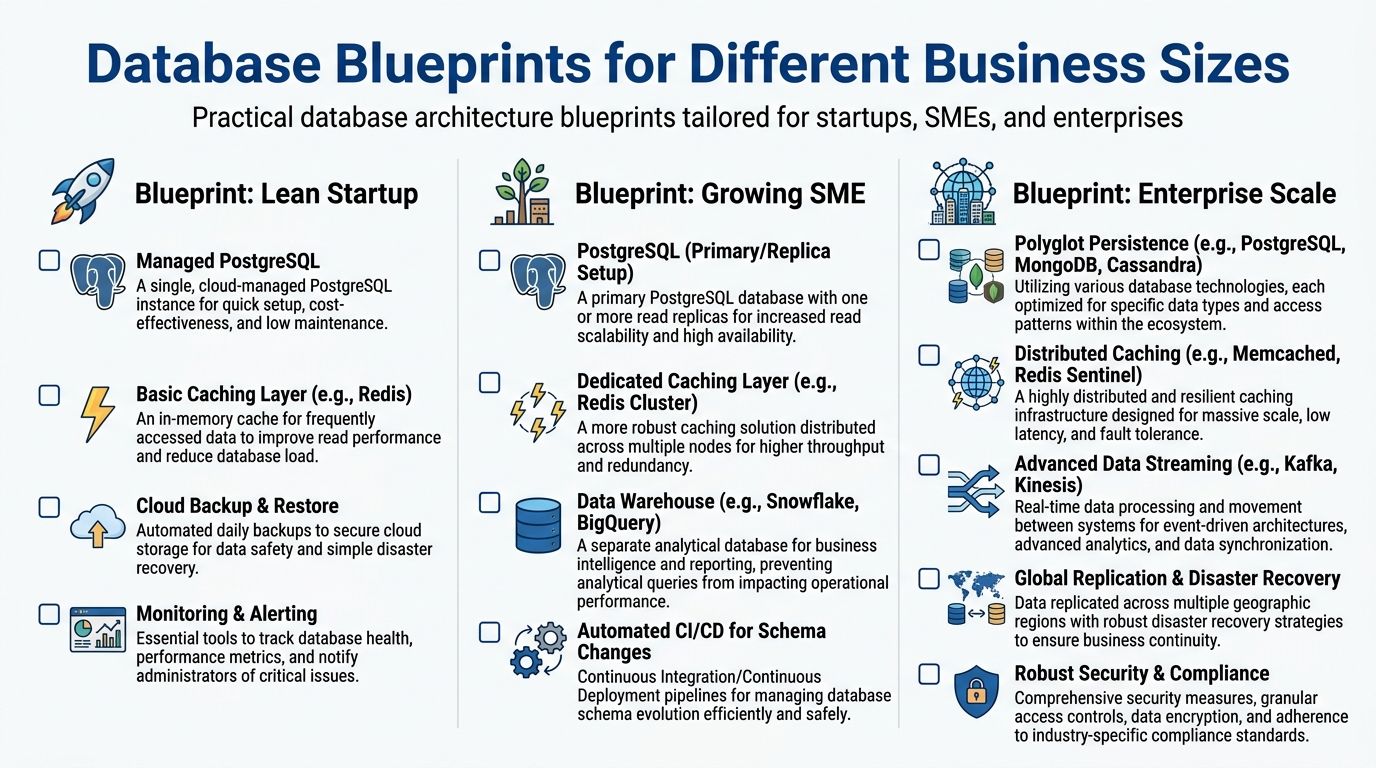
The blueprint graphic below is a useful way to frame those stages.
Lean startup blueprint
Use this when the company is still searching for product-market fit and engineering time is scarce.
Core setup:
- Managed PostgreSQL for the transactional core
- Basic Redis cache for frequently accessed reads
- Automated backups and restore drills
- Monitoring and alerting for query health, storage growth, and resource pressure
This blueprint works because it keeps the architecture legible. One relational core is easier to reason about, easier to migrate, and easier to support. For most early products, the bigger risk isn't under-architecture. It's complexity introduced before usage patterns are stable.
A practical rule matters here. For high-traffic database architectures, starting with Third Normal Form is the recommended baseline, but strategic denormalization should be applied when performance testing reveals bottlenecks in complex queries (3NF baseline guidance). Start clean. Optimise only when evidence says the joins are hurting.
Growing SME blueprint
Use this when traffic is more predictable, reporting demands are growing, and one database is starting to serve too many masters.
Recommended components:
- Primary PostgreSQL with read replica
- Dedicated Redis layer
- Separate analytical store or warehouse for reporting
- Schema migration workflow in CI/CD
- Early service separation for clearly distinct domains
This stage is where many businesses save money by becoming more deliberate, not more exotic. Move dashboard and reporting workloads away from the primary transaction database. Keep the write path simple. Treat the read replica as read capacity and resilience, not as an excuse to ignore poor query design.
A good fit for this stage is often custom software development for business-specific systems, especially when off-the-shelf platforms no longer reflect the actual workflow, data model, or compliance needs of the company.
Enterprise blueprint
Use this when the business has strict uptime expectations, complex data flows, stronger compliance requirements, and multiple product domains.
Typical architecture choices include:
| Layer | Practical choice | Why it exists |
|---|---|---|
| Transaction core | Relational database for business-critical writes | Keeps financial and operational state correct |
| Flexible data layer | Document or wide-column store where needed | Supports specialised workloads without bending the core |
| Caching | Distributed Redis or Memcached setup | Protects primary systems from heavy read demand |
| Streaming | Event pipeline such as Kafka or Kinesis | Decouples producers and consumers for real-time flows |
| Recovery and residency | Replication, regional controls, disaster recovery model | Supports continuity and compliance expectations |
At this level, polyglot persistence often makes sense because no single engine serves every access pattern well. But governance becomes part of the architecture. Teams need clear ownership, migration discipline, and a strong model for data contracts.
A scalable enterprise architecture is less about having more tools and more about giving each tool one clear job.
The wrong move at enterprise scale is accidental sprawl. If every team chooses a new database because it feels convenient, support and compliance get harder quickly. The best enterprise systems are usually the ones with the fewest unnecessary exceptions.
Frequently Asked Database Architecture Questions
When should we move from one database to service level separation
Move when one shared database is slowing the organisation, not when a conference talk makes microservices sound attractive. Good signals include repeated schema collisions between teams, one workload hurting another, and parts of the product needing different scaling or compliance rules. If the issue is still just a few slow queries, fix the queries first.
How do we handle database changes without downtime
Use additive changes wherever possible. Add new columns or tables first, deploy application code that can work with both old and new shapes, backfill safely, then remove old paths later. The dangerous approach is bundling schema changes and application assumptions into one irreversible release.
What signals say we have outgrown the current design
Look for operational symptoms, not just higher traffic.
- Read pressure keeps hitting the primary: That usually means it is time for a stronger caching strategy. To reduce load on primary databases for frequently accessed data in scalable apps, an effective caching layer using Redis or Memcached must be implemented to dramatically lighten the load on the primary database node (caching guidance).
- Reporting slows customer workflows: Your analytical workload should probably move away from the transaction path.
- Simple schema changes become risky: That points to poor boundaries and rising coupling.
- Cloud spend rises faster than product value: Often a sign that scaling is being bought through bigger instances instead of better design.
How do we estimate database cost realistically
Break cost into behaviour, not just instance size. Ask four questions.
What are the hottest read paths?
If many requests fetch the same data repeatedly, caching will change the cost curve.Which writes are business-critical?
These determine the reliability and consistency guarantees you're paying for.How much non-operational traffic hits the database?
Admin exports, reports, sync jobs, and background tasks often consume more than teams expect.How hard would recovery be after failure?
Backups are cheap compared with downtime, trust loss, and recovery confusion.
The most reliable cost model is iterative. Measure actual query behaviour, storage growth, cache hit patterns, and replica load. Then project based on the product's usage model, not just on vendor calculators.
If you're building a product that's starting to strain under real usage, LitSpark Solutions Private Limited helps teams design and modernise database-backed applications with stronger cloud architecture, scalable product engineering, and practical delivery support. For startups, SMEs, and enterprise teams that need systems built for performance, compliance, and growth, it's a sensible partner to bring in before technical debt becomes the roadmap.
- database architecture design
- database design
- system architecture
- data modeling
- cloud databases