15 min read
React Native App Development: A Complete Business Guide For
Discover how React Native app development cuts costs, speeds launches, and scales for startups and enterprises. Practical insights and tips for 2026.
By the LitSpark Solutions team · Updated
- AI Automation
- Advertising
- Designing
- Development
- Digital Marketing
- MVP
- Resource Hiring
- Shoot

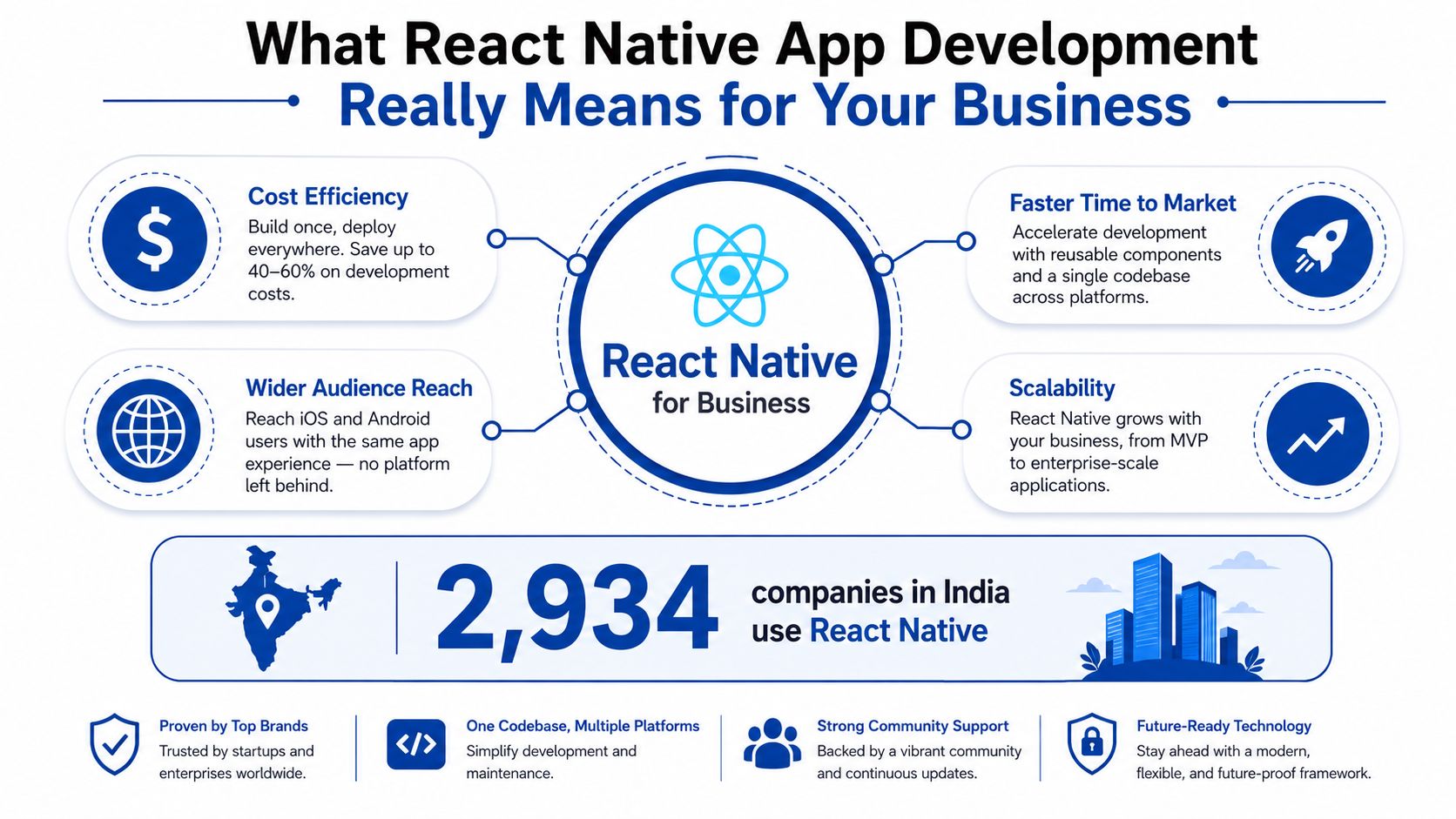
2,934 companies in India already use React Native according to the dataset cited for 2025, and India is the second-largest country in that count after the United States. That matters because react native app development in India is no longer an experiment. It's a hiring, delivery, and product strategy decision backed by a real installed base, not just enthusiasm from global conference slides.
For founders and product leaders, the question isn't whether React Native can build an app. It's whether it can build the right app, for the right device mix, with the right team structure, at a cost that still leaves room for growth. Used well, it shortens launch cycles and reduces duplication. Used badly, it turns into a compromise that slows every release and forces painful rewrites later.
Table of Contents
- What React Native App Development Really Means for Your Business
- The Honest Trade-Offs of React Native Compared to Alternatives
- Inside the Architecture and Tech Stack That Actually Ship to Production
- The React Native Development Lifecycle From Kickoff to App Store
- Cost, Timeline, and ROI You Can Actually Plan Against
- Performance, Offline Resilience, and Platform Considerations in 2026
- Hiring the Right React Native Team Without Getting Burned
What React Native App Development Really Means for Your Business
React Native is a cross-platform framework, which means one product team can ship to iOS and Android from a shared codebase instead of building two separate apps from scratch. The business value is direct. You get one design system, one engineering plan, and one set of business logic, while the final app still feels native on each platform. For Indian companies, that matters because the market can support hiring, implementation partners, and internal capability building without forcing every project into a full native split.
What it is and what it isn't
React Native is not a web wrapper pretending to be an app. It renders real native UI primitives, so your screens are built from native components rather than a browser view. That difference shows up in performance, touch behaviour, and the feel users notice the moment they scroll, tap, and type.
At a product level, the framework lets your team keep core screens, API orchestration, and business rules in shared code, while native modules handle device-specific work. Camera access, Bluetooth, NFC, and frame-critical animation should not be forced through a generic abstraction just to keep the codebase “pure”. If you want a practical implementation partner that ships mobile products, start with a team that can handle both app development and connected backend work, such as LitSpark's mobile app development service.
Practical rule: if your app is mostly forms, feeds, booking flows, dashboards, or commerce journeys, React Native deserves a serious look. If your product lives or dies on custom graphics, sensor-heavy interactions, or low-level device work, don't pretend the cross-platform savings are free.
The business test is simple. If you need one launch plan, one codebase, and one hiring lane, React Native can reduce duplication without making the product feel second-rate. If your roadmap depends on a lot of hardware-specific behaviour, the framework can still work, but only if you isolate those features early and budget for native work where it belongs.
For founders focused on growth, the useful question is how the framework supports acquisition, retention, and delivery speed. A good companion read on effective mobile app growth fits here, because the framework choice should support your launch and retention plan, not sit apart from it.
The business decision behind the framework
React Native is best treated as a portfolio decision. You trade some absolute control for faster delivery, broader talent access, and less duplicated effort. That trade only works when the app category and team discipline match the framework's strengths.
Here's the strategic filter I use with Indian startups and SMEs:
- Choose React Native early when the first release needs both Android and iOS, the UI is business-oriented, and the team wants to move fast without doubling headcount.
- Choose it carefully when the app includes a few native-heavy modules, because those can still be isolated cleanly.
- Avoid it when the product is primarily compute-heavy, animation-heavy, or device-API-first, because the cost of forcing those flows into shared code shows up later in support tickets, slow reviews, and rewrite pressure.
React Native belongs on the shortlist when the business wants speed, shared hiring, and lower initial complexity. It does not belong there just because it is popular. For teams that want execution help, a good mobile app development partner can separate the parts that belong in shared code from the parts that need native treatment, which is exactly how you keep the roadmap honest and the build maintainable.
The Honest Trade-Offs of React Native Compared to Alternatives
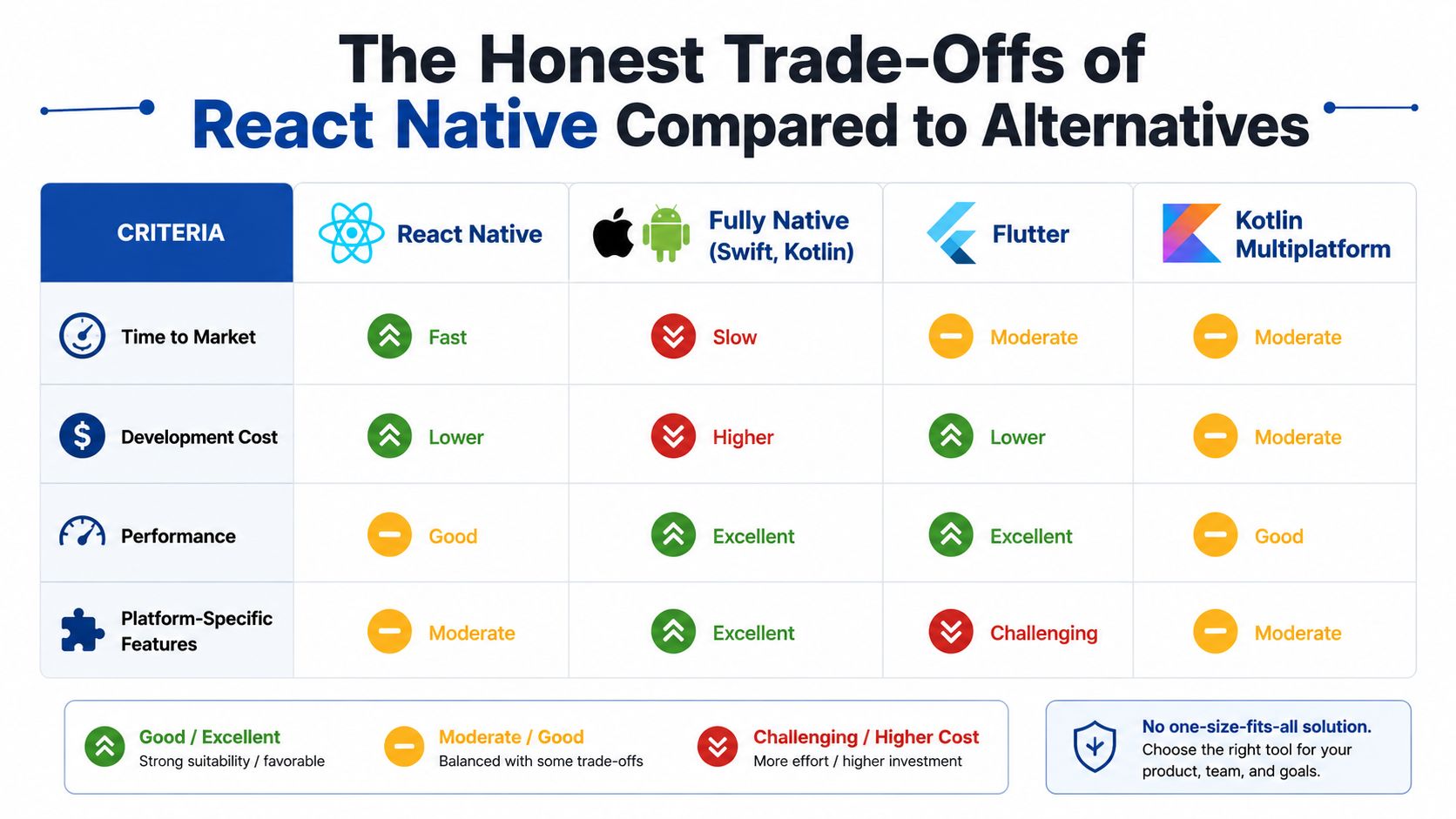
Most guides compare React Native to native apps as if the only question is development speed. That's too shallow. The real comparison is time to market, development cost, performance ceiling, hiring availability, and maintainability against four alternatives: fully native, Flutter, and Kotlin Multiplatform.
Where React Native wins
React Native's main advantage is that it lets product teams ship one app experience to both platforms without duplicating every screen and workflow. That gives it a clear edge for commerce, booking, service, and content products where the UI is important, but the app isn't trying to push the device to its limits.
Fully native still wins on absolute performance and platform precision. Kotlin Multiplatform is attractive when teams want to share business logic but keep platform UI separate. Flutter is strong when you want a highly controlled rendering stack and a uniform visual layer. React Native sits in the middle, and that middle is exactly why many Indian teams choose it. It cuts enough duplication to matter, while keeping the codebase close to standard React and TypeScript skills.
Where it loses
The uncomfortable data point is real. In published comparative testing, React Native took 52.64% longer than Swift in a 500-element test, and it was slower than Kotlin in 27 of 36 cases, or 75% of the tested scenarios source. That doesn't mean React Native is “slow” in every app. It means it loses badly when the workload is resource-intensive.
So if your roadmap includes graphics-heavy feeds, complex transitions, heavy local computation, or high-frequency device interactions, don't wave those risks away. Build them natively or isolate them behind native modules. For typical business apps, though, the productivity upside still dominates. A team building a catalog, a booking app, a CRM companion, or a D2C front end usually gets more value from shipping sooner than from chasing perfect benchmark numbers.
React Native is a business accelerator, not a physics cheat code.
The best mental model is this. Native gives you the highest ceiling. Flutter gives you a tightly controlled rendering approach. Kotlin Multiplatform shares code where it hurts least. React Native gives you the broadest pragmatic balance when your product needs to move fast across both platforms and your user experience doesn't depend on low-level performance tricks in every screen.
Inside the Architecture and Tech Stack That Actually Ship to Production
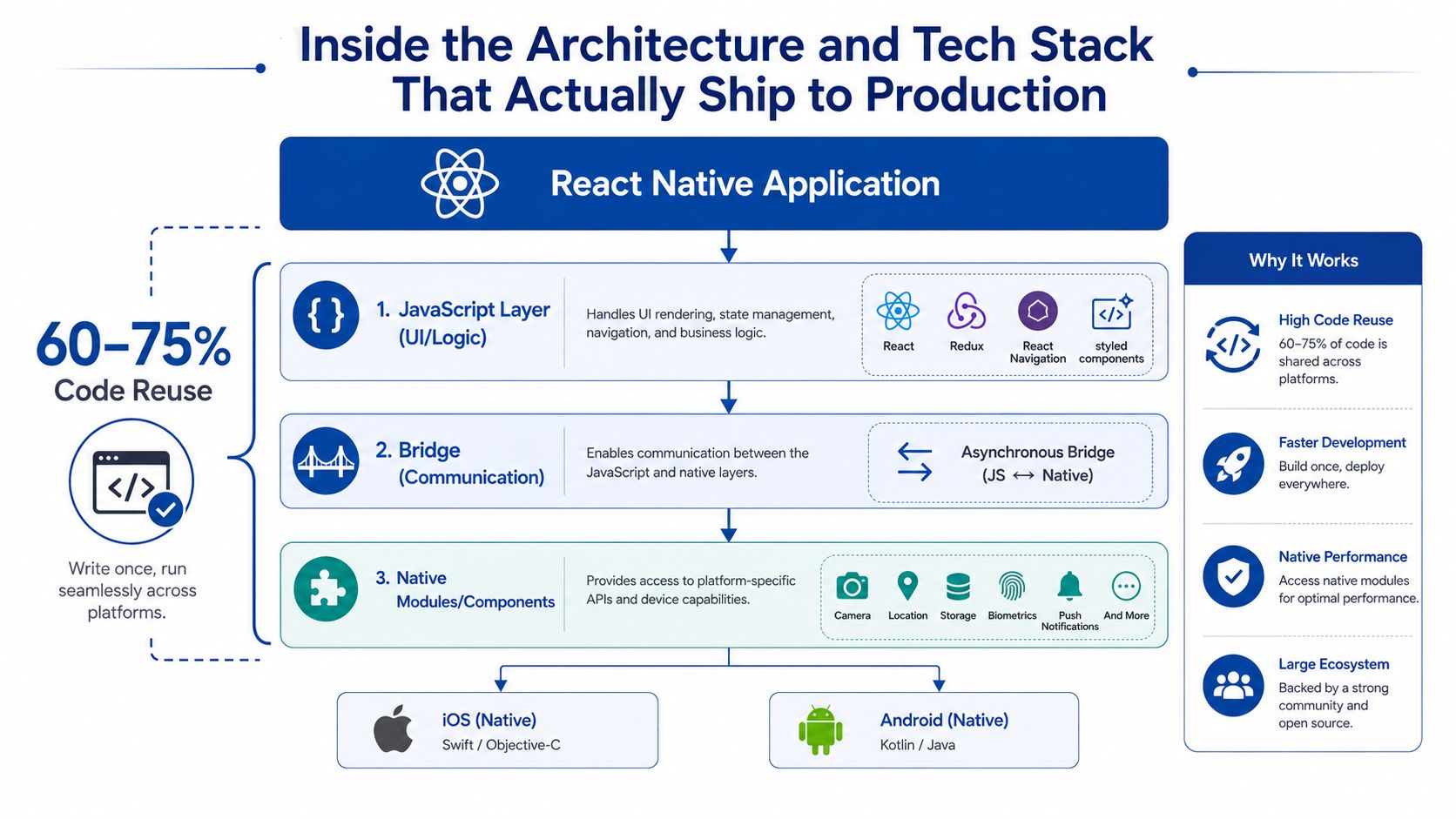
A production React Native app is not just a folder full of screens. It's a split architecture where shared JavaScript handles the repeatable product logic, and native modules handle the parts that need direct device access. In real deployments, teams usually achieve roughly 60–75% code reuse across iOS and Android source, which is enough to change the economics of a build without pretending the platforms are identical.
What belongs in shared code
Keep business logic, API orchestration, state handling, and core screens in the shared layer. That's where React Native earns its keep. If a screen behaves the same on both platforms, there's no reason to rewrite it twice just to satisfy an architectural vanity project.
The other side of the split is just as important. Native-heavy features such as camera flows, Bluetooth, NFC, custom animations, and payment integrations should be isolated into native modules rather than bent into generic JavaScript abstractions. That keeps the shared layer clean and prevents one awkward feature from contaminating the whole codebase.
Rule of thumb: if the feature depends on a device capability or frame-perfect interaction, don't fight the platform. Wrap it.
Why the New Architecture matters
React Native's New Architecture uses JSI, Fabric, and TurboModules to reduce bridge overhead and improve responsiveness, especially for synchronous native calls. In business terms, that means smoother interactions, faster startup, and less friction on the UI thread. For Indian products targeting a wide Android device mix, that matters because the margin for sloppy performance is thin.
The architecture shift also changes what teams should expect from React Native in 2026. The framework is no longer just about quick UI delivery. It's becoming more useful for native-heavy capabilities that still need shared product logic, including voice, notifications, camera, and on-device intelligence. That's a meaningful shift for enterprises that want speed without giving up local device features.
Stack choices that stay sane
Expo is the right default for new teams unless you have a clear reason not to use it. It gives you a managed production path, build tooling, and a cleaner way to deal with common app concerns. Use TypeScript from day one, because large mobile codebases become messy fast without types.
For state, pick the simplest tool that matches your app. Redux Toolkit works when state needs to be explicit and well-structured. Zustand is lighter and often enough for product teams that want less ceremony. React Query is the obvious choice for server state and caching. For navigation, use a mature library and stop trying to invent your own routing layer.
For teams that need engineering support across mobile and cloud, LitSpark's cloud and DevOps services fit naturally into the same delivery stack. That matters because mobile release reliability depends on build pipelines, signing, observability, and deployment discipline as much as on UI code.
The React Native Development Lifecycle From Kickoff to App Store
A React Native project doesn't fail because the code is hard. It fails because the team skips the boring work early, then discovers the missing pieces during store review or QA. In Indian delivery environments, that usually means weak device testing, poor network assumptions, and release planning that ignores how App Store and Play Store reviews behave.
The clean lifecycle starts with discovery. Product and engineering need a short scope document, a screen map, and a list of device and OS targets. That's where you decide whether the app is MVP-only, growth-ready, or built to support long-term native modules. If you skip this step, every later estimate becomes fiction.
From design to beta
UI and UX work should be done for both platforms, not just adapted from web screens. Android and iPhone users don't want identical interfaces, they want interfaces that behave naturally on their devices. Once the core design system is locked, the team can move into sprint-based development, usually starting with authentication, navigation, core flows, and API integration.
QA should be split into automated and manual testing. Automated tests catch regressions. Manual testing catches what scripts miss on real devices, especially lower-end Android hardware that still matters in India. That includes memory pressure, typing lag, navigation jitter, and weird edge cases when the network drops mid-flow.
Release and review
CI/CD should be in place before the first serious beta. Tools like Fastlane and EAS reduce release friction, but only if build signing, environment variables, and app-store metadata are handled properly. Beta distribution via TestFlight and Android internal tracks should happen before public submission, because first-time teams always underestimate how much polish reviewers expect.
Store submission is where novice teams get burned. Data safety forms, login access for reviewers, usage descriptions, and signing details need to be accurate. Apple reviews are usually stricter than Google's, so don't treat the two stores as equal.
A realistic MVP cadence looks like this:
- Discovery and scoping, one focused sprint.
- Design and prototype alignment, one sprint.
- Core development, several sprints based on feature count.
- QA, beta, and store preparation, one to two sprints.
- Submission and revision buffer, because review cycles can force fixes.
The teams that ship cleanly give every phase one owner. Product owns scope. Design owns usability. Engineering owns implementation. QA owns device coverage. Release management owns the final submission. If one person owns all of it, the project usually slips.
Cost, Timeline, and ROI You Can Actually Plan Against
If you're a founder or CFO, you don't need abstract “savings”. You need a budget range you can defend. The best benchmark available in 2025 and 2026 is that React Native can reduce development time by 30–40% compared with native development and lower development costs by about 25% to 43% in benchmarked MVP scenarios source. Use those ranges as planning input, not as a promise.
The savings are real when the app is mostly shared screens, API calls, and standard product flows. They shrink when the roadmap includes custom animations, deep platform work, or a large QA matrix. They also shrink when the team treats React Native as “cheaper” and then keeps adding native exceptions without design discipline.
What drives the numbers
The main cost drivers are straightforward:
- Screen count, because more screens mean more design, more state, more test cases.
- Custom interactions, because animations and gesture-heavy flows need extra care.
- Third-party integrations, because every SDK adds setup, verification, and maintenance.
- Backend complexity, because weak APIs create mobile delays that engineering has to absorb.
- QA matrix, because Android fragmentation turns a “done” screen into a device-testing exercise.
If you want a quick planning aid, an interactive React Native cost estimator can help frame the conversation before you start vendor interviews. Treat it as a conversation starter, not a quotation engine.
Indicative planning bands
| Project Tier | Typical Features | Timeline | Indicative Cost (USD) |
|---|---|---|---|
| MVP | Login, core flows, API integration, basic push notifications | Faster than a native build, with the exact range depending on scope | Lower than a comparable two-codebase build |
| Growth-stage product | Multiple user roles, dashboards, payments, richer analytics, offline sync | Still shorter than dual native delivery when the shared layer is disciplined | Below full duplication, but higher than a thin MVP |
| Enterprise rebuild | Complex permissions, legacy migration, device integrations, audit needs | Longer than a simple MVP because review, security, and QA expand | Higher than a startup app, but usually still better than building twice |
Those bands are qualitative on purpose, because the actual cost depends on scope. The business outcome you're buying is faster time to revenue, a smaller initial team, and lower duplication across platforms. That's why React Native makes financial sense for many Indian startups and SMEs. It helps the product reach users before the market moves on.
Performance, Offline Resilience, and Platform Considerations in 2026
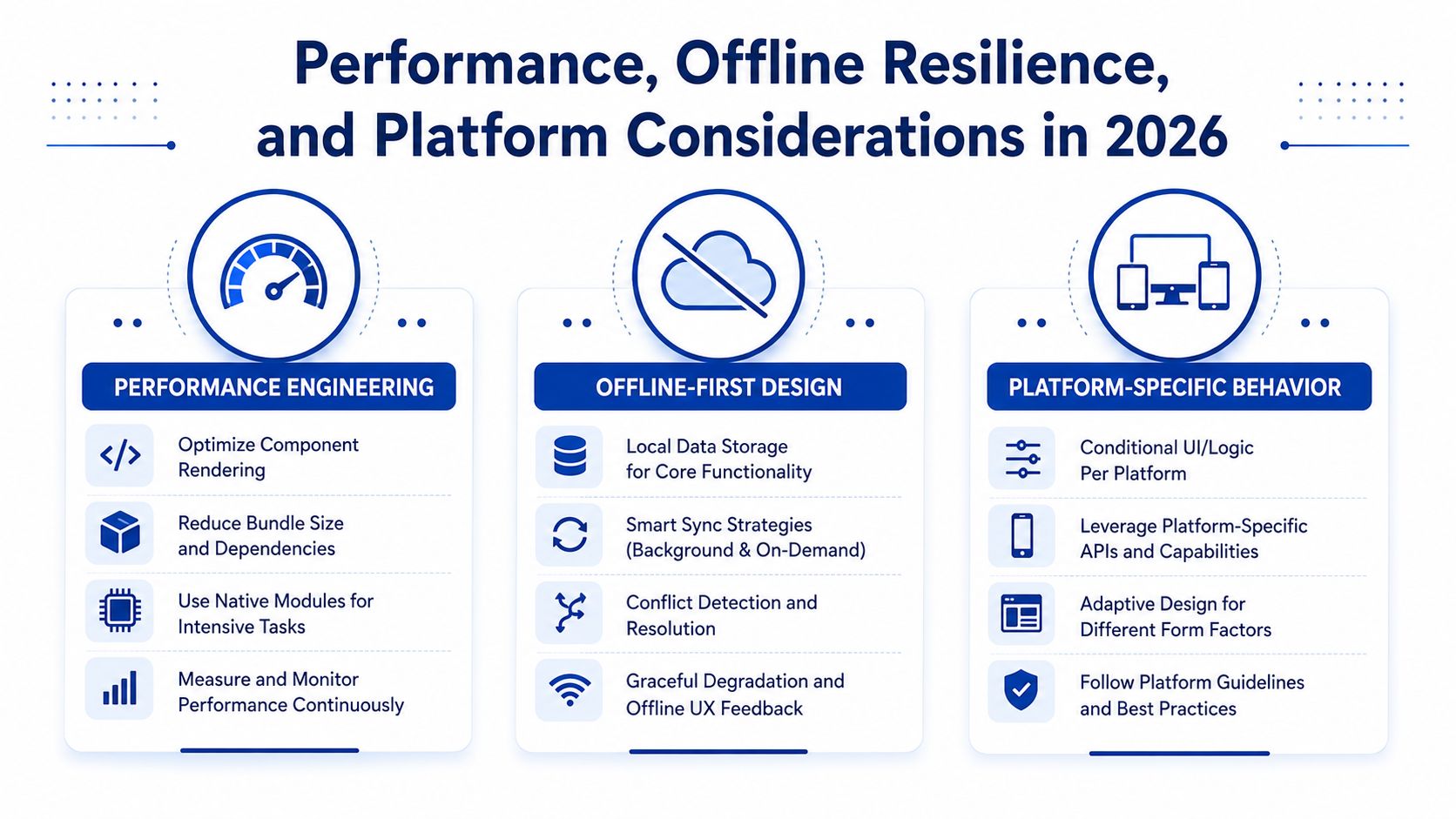
The biggest mistake teams make is treating performance, offline design, and platform behaviour as separate topics. They're not separate in production. A screen that renders well but fails offline is still a broken product. A feature that works on fibre broadband but stutters on mid-range Android phones is still a weak launch.
Performance discipline first
React Native's official performance guidance is blunt for a reason. Use FlatList and SectionList for long lists, define getItemLayout when item sizes are known, memoize heavy subcomponents, and remove debug-only console.* calls before bundling because they add runtime overhead and slow startup on-device source. That guidance matters more in India because Android dominates usage, and low-memory devices show every mistake immediately.
If your feed or catalogue screen scrolls badly on a low-end Android phone, you don't have a polish issue. You have an architecture issue.
The right move is to profile early on actual devices, not just simulators. Make render frequency a first-class metric. If a screen is expensive, split it. If a list is long, virtualise it. If a module is frame-critical, push it behind native code.
Offline-first is not optional for many Indian products
Offline resilience deserves a place in the product brief, especially for Tier 2 and Tier 3 users with unstable connections. That means local caching, retry queues, background sync, and conflict handling. Don't wait until after launch to decide how the app should behave when the network drops during checkout, onboarding, or support workflows.
Public discussions around React Native often focus on setup, navigation, and UI. The deeper product question is how the app behaves when the user is stuck on unreliable connectivity. For Indian transactional products, that's a core requirement, not an edge case. Offline flows don't just reduce frustration, they protect revenue and support load.
New Architecture and Hermes in practice
The New Architecture and Hermes change the 2026 calculus. They improve startup characteristics and make the runtime more practical for features that need tighter native interaction. That opens the door to more ambitious product work, including on-device AI and voice features, without abandoning shared code entirely.
Migration is worth it when the app already shows performance debt, the user base is growing, and the team can justify the engineering effort. Don't migrate because the architecture sounds modern. Migrate because your current app has measurable startup pain, list jank, or native-module bottlenecks that the new stack can fix.
Hiring the Right React Native Team Without Getting Burned
Framework debates are overrated. Team quality decides the outcome. I'd rather see a disciplined team on a solid React Native stack than a flashy architecture owned by people who can't ship stores, QA, or maintenance properly.
The hiring model depends on your company stage. In-house teams work when mobile is strategic and you plan to iterate for years. Dedicated developers from a vendor fit companies that want speed without permanently adding headcount. Fixed-scope agencies work for crisp MVPs. Freelancers are the riskiest option unless the scope is tiny and the product owner is technical.
For companies that need broader talent options, Hire LATAM talent can be part of the resourcing conversation, especially if you're comparing time zones, seniority, and delivery models against local hiring.
What to check before you sign
Use a non-technical checklist. It catches weak teams fast.
- Production portfolio: Ask for real apps already in stores, not mockups or demo clips.
- Code ownership: Make sure IP, repo access, and handover terms are written clearly.
- Maintenance process: Ask how they handle fixes after launch, not just the build itself.
- Store experience: They should know Play Store and App Store review issues cold.
- Security handling: They should explain secrets, credentials, and environment separation plainly.
- Migration readiness: Ask how they'd handle the New Architecture if your app grows.
If you're hiring through a team that also provides a broader engineering bench, LitSpark's resource hiring service is one model for getting screened developers into a project quickly, but the same diligence still applies. The vendor must prove they've shipped and maintained at least three production apps before you trust them with your release cycle.
Three questions that expose weak teams
- How do you handle low-end Android testing before beta? If they can't answer clearly, they haven't shipped for the Indian device mix.
- What breaks first when offline sync fails mid-transaction? If they dodge the question, they're not designing for real users.
- Which modules would you keep native from day one? If the answer is “none”, they're probably overpromising.
A strong RFP is short and specific. State your target platforms, device assumptions, core flows, release window, maintenance needs, and expected native dependencies. Then ask the vendor to show how they'd structure shared code, isolated modules, and release management.
Choose React Native when the business case is clear, the device matrix is realistic, and the vendor can prove they've shipped real apps, not just prototypes. That rule saves more money than any framework debate ever will.
If you want a delivery partner that understands React Native product trade-offs in India, LitSpark Solutions Private Limited can help with app development, cloud setup, QA pipelines, and resource hiring under one roof. Visit LitSpark Solutions Private Limited to discuss a build, a migration, or a mobile team extension that fits your roadmap.
- react native
- mobile app development
- cross-platform apps
- app development cost
- hiring developers