Development18 min read
Hybrid App Development: A Practical 2026 Guide
Explore hybrid app development with this practical guide. Compare native, PWA, and cross-platform approaches to find the best fit for your business.
By the LitSpark Solutions team · Updated
- AI Automation
- Advertising
- Designing
- Development
- Digital Marketing
- MVP
- Resource Hiring
- Shoot

You’re probably in one of two situations right now. Either you need a mobile app live fast because investors, customers, or channel partners are waiting, or you already have a web product and you’re trying to decide whether building separate iOS and Android apps is worth the cost.
For most founders in India, that decision isn’t academic. It affects runway, hiring, release dates, and whether the first version of the product reaches users before the market moves on. Hybrid app development sits right in the middle of that tension. It promises lower cost and faster delivery, but the answer isn’t “hybrid is always better” or “native is always better”. It depends on what your app does, how your users behave on Indian mobile networks, and how much complexity your team can support after launch.
A lot of founders make the wrong call because they frame this as a technology debate instead of a business decision. The better question is simpler. Which approach gets your product into users’ hands with the least avoidable risk?
If you’re still weighing whether to build software internally, outsource it, or buy an off-the-shelf solution, this Pratt Solutions build vs buy overview is a useful companion read before you commit budget. That decision often comes before the native-versus-hybrid debate.
Table of Contents
- The Founder's Dilemma Balancing Speed Cost and Quality
- Decoding App Development Paths Native vs Hybrid vs PWA
- Understanding Modern Hybrid App Architecture
- Choosing Your Framework The 2026 Landscape
- Flutter for consumer apps that need visual consistency
- React Native for teams that need speed and easier hiring
- Ionic and Capacitor for operational apps, portals, and web-first teams
- Kotlin Multiplatform for products that need native UX but shared business logic
- A practical decision framework for founders
- Navigating the Hybrid Development Lifecycle
- Performance and Cost A Realistic Analysis for India
- How LitSpark Helps You Build and Scale Your App
The Founder's Dilemma Balancing Speed Cost and Quality
A Bangalore founder building a D2C brand usually starts with a simple assumption. Build the app once, launch on both platforms, keep costs under control. Then the quotes come in. Native iOS and Android mean separate codebases, separate specialists, separate release cycles, and a longer wait before customers can even test the product.
That’s where hybrid app development becomes attractive. Not because it’s fashionable, but because it changes the economics of the first release. A single team can move faster, the product can reach users earlier, and feature changes don’t need to be duplicated in two completely separate apps.
But the catch is real. Some apps fit hybrid development cleanly. Others don’t. A loyalty app, booking flow, B2B operations dashboard, learning platform, or content-led service app can often do very well with a modern hybrid stack. A real-time trading app, graphics-heavy mobile game, or catalogue-heavy commerce experience on patchy networks needs a much harder look.
Practical rule: Founders shouldn’t ask whether hybrid is cheaper. They should ask whether hybrid is cheaper for their app’s actual usage pattern.
The strongest teams make this decision early, before design and feature creep lock them into the wrong architecture. They map out three things first:
- Core user journey: What must feel instant, smooth, and reliable on day one.
- Device dependency: Whether the app relies heavily on camera, GPS, Bluetooth, background services, or platform-specific behaviours.
- Growth path: Whether the first release is an MVP, a long-term product, or a stepping stone to a more specialised native build later.
That’s the lens that matters. Hybrid app development isn’t a shortcut. It’s a trade-off. Used in the right place, it’s a smart one.
Decoding App Development Paths Native vs Hybrid vs PWA
A practical way to think about the options
Native, hybrid, and PWA aren’t interchangeable labels. They solve different business problems.
Native is like building two custom homes. One sits perfectly on iOS land, the other on Android land. You get tight control, deep platform access, and the most predictable performance ceiling. You also pay for two builds, two maintenance tracks, and more coordination.
Hybrid, in modern terms, is closer to a high-quality modular system. One core structure supports both platforms, with selective adjustments where needed. That shared foundation is what makes hybrid app development attractive for startups and SMEs that need reach without doubling engineering effort.
PWA, or progressive web app, is different again. It’s a web product designed to behave more like an app inside the browser and sometimes from a home screen shortcut. It can be a smart choice for lightweight commerce, content, support workflows, and early validation, especially when app store friction is a problem.
The confusion usually comes from older definitions. Many people still hear “hybrid” and think of apps that were basically websites wrapped inside a mobile shell. That approach often relied heavily on WebView rendering and felt limited when interactions became dense or animated. Modern frameworks such as Flutter and React Native changed that conversation because they don’t depend on the same constraints.
If you want a second viewpoint on the trade-offs, this balanced mobile app development comparison is useful because it frames the decision in practical terms rather than ideology.
App Development Approaches A Head-to-Head Comparison
| Approach | Performance | Development Cost | Time-to-Market | Best For |
|---|---|---|---|---|
| Native | Highest ceiling and deepest platform control | Higher because iOS and Android are built separately | Slower because two app tracks must be developed and maintained | Hardware-heavy apps, graphics-intensive products, strict platform-specific experiences |
| Modern hybrid | Strong for most business and consumer use cases when built well | Lower than native because much of the codebase is shared | Faster because one team can ship across platforms | Startups, SMEs, MVPs, D2C apps, internal tools, service apps |
| Traditional WebView hybrid | Acceptable for simple workflows, weaker under complex UI loads | Lower upfront, but can create experience issues later | Fast to start | Very simple apps, temporary wrappers, basic utilities |
| PWA | Good inside the browser for many use cases, but not equal to full app behaviour in every scenario | Often the lightest entry path | Very fast for launch and iteration | Content, lightweight commerce, early validation, support portals |
A founder should also separate market access from technical architecture. Native and hybrid apps both go through app stores. A PWA doesn’t depend on that route in the same way. If distribution through the browser matters more than deep device integration, the answer may not be hybrid at all.
The wrong comparison is “which technology is best”. The right comparison is “which approach protects cash while still meeting user expectations”.
This is why hybrid app development works well when the app’s core value comes from workflow, transactions, communication, booking, subscriptions, or content consumption. It works less well when the app’s competitive edge comes from raw device-level performance under difficult conditions.
Understanding Modern Hybrid App Architecture
What sits inside a hybrid app
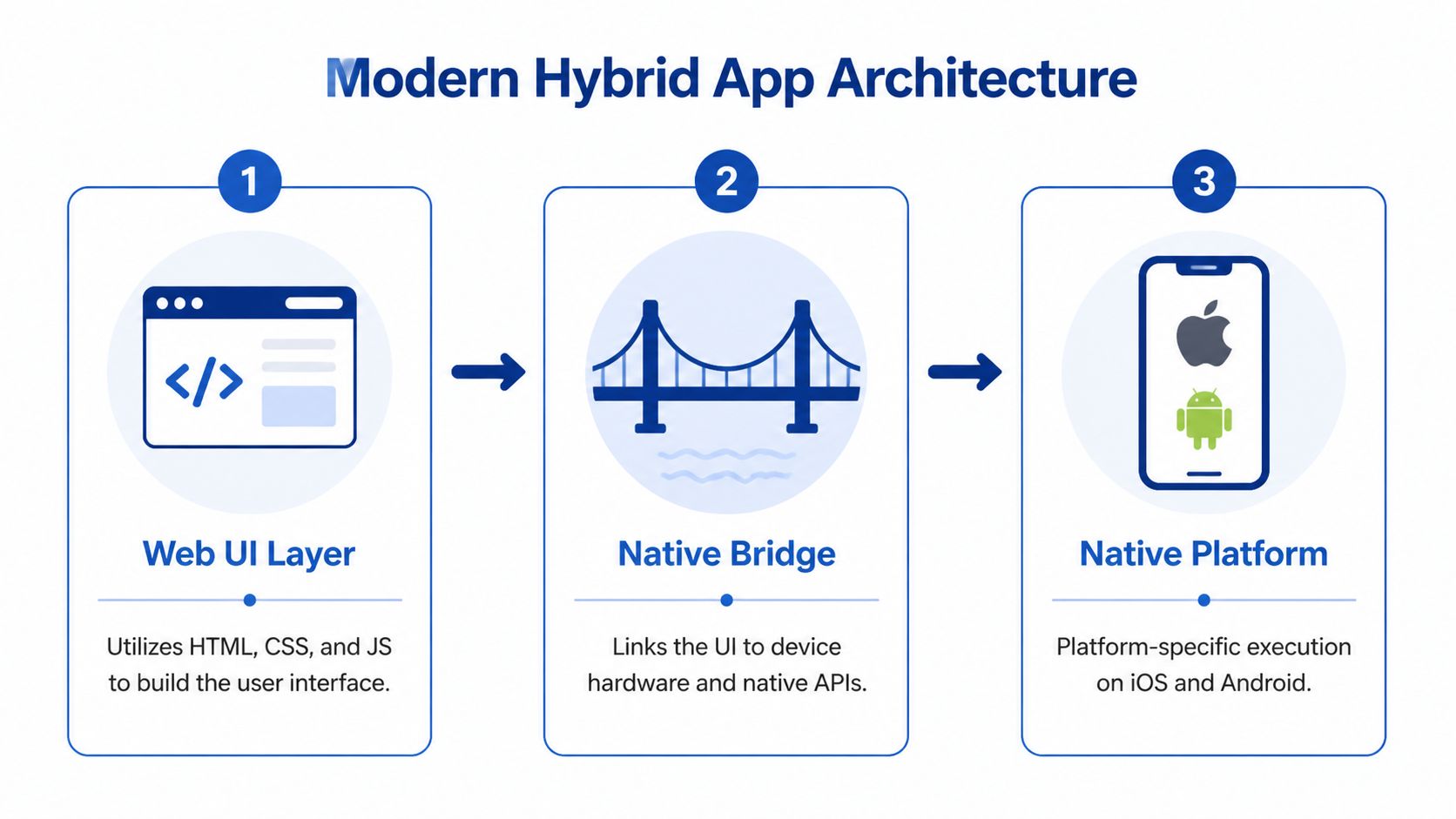
Most non-technical founders don’t need every implementation detail, but they do need to understand the moving parts. A modern hybrid app usually combines three layers.
First, there’s the shared application layer. Most business logic, navigation, state management, validation rules, and interface behaviour live in this layer. Depending on the framework, teams typically write this in JavaScript, TypeScript, or Dart.
Second, there’s the native bridge or platform interface. This layer lets the shared app code talk to device capabilities such as camera access, GPS, push notifications, biometric authentication, file storage, and payment SDKs. If your app needs something unusual, this is often where custom native work enters the picture.
Third, there’s the platform runtime on iOS and Android. This is what executes the app on the device, packages it for store submission, and handles OS-level behaviour.
A founder doesn’t need to memorise those layers. What matters is knowing where complexity appears. If your app is mostly forms, flows, dashboards, and content, the shared layer carries most of the load. If your product depends on hardware behaviour or specialised SDKs, the bridge and native layer become more important.
Why older hybrids felt slow
The reputation problem around hybrid app development came from older architectures. Many early hybrid apps rendered large parts of the interface inside a WebView. That meant the app often behaved like a website placed inside a mobile shell. Simple screens were fine. Heavy interactions weren’t.
Modern frameworks improved this in different ways. React Native renders through native components. Flutter uses its own rendering approach rather than depending on a browser engine. That architectural shift changed the user experience far more than most high-level comparisons explain.
Here’s the practical difference:
- WebView-heavy approach: Best for simple wrappers and basic flows, but easy to expose under complex UI movement.
- Native-rendered cross-platform approach: Better suited for polished product interfaces, richer interaction design, and smoother transitions.
- Hybrid plus native modules: Useful when most of the app can stay shared, but a few device-specific features need deeper platform code.
If a team says they’re building a hybrid app, ask one follow-up question. “Is the UI rendered like a web app, or through a native-rendered framework?”
That single question usually tells you whether you’re discussing an efficient product build or a technical shortcut.
For founders, the architectural takeaway is simple. Don’t evaluate hybrid app development as one monolithic category. A Flutter app, a React Native app, and a WebView wrapper may all be called “hybrid” in sales conversations, but they are not the same product experience.
Choosing Your Framework The 2026 Landscape

A founder in Mumbai approves a feature on Friday, expects a test build on Tuesday, and wants both Android and iOS ready for investor demos in six weeks. That is usually the moment framework choice stops being a technical debate and becomes a business decision.
The right question is not which framework is best in general. It is which one fits your product, your hiring reality, and your users' conditions in India. That last point matters more than many teams admit. If your users are dealing with uneven 4G coverage, lower-cost Android devices, and patchy background sync, a framework that looks fast in office Wi-Fi tests can still feel slow in production.
Hybrid can reduce first-release cost and shorten delivery time compared with building two full native apps, especially for startups that need one team instead of two. The savings are real, but they are not automatic. They disappear fast if the wrong framework forces custom native work, repeated performance fixes, or a rewrite after product-market fit. If you’re evaluating delivery partners alongside framework options, reviewing mobile app development services for hybrid and native builds helps compare team structure, maintenance scope, and post-launch ownership.
Flutter for consumer apps that need visual consistency
Flutter is a strong fit for products where interface quality drives trust. I usually recommend it for commerce apps, booking flows, loyalty products, and consumer services where polished onboarding and consistent screens matter across a wide Android device range.
That consistency is useful in India, where screen sizes, GPU capability, and OS versions vary more than many founders expect. Flutter gives teams tighter control over how the UI appears across those devices. The trade-off is practical. App size can be higher, and some third-party SDKs or hardware integrations still need native code. If your roadmap includes advanced Bluetooth handling, device-level payment integrations, or heavily customised platform features, factor that into budget early.
Choose Flutter when product experience is part of the business case, not decoration.
React Native for teams that need speed and easier hiring
React Native often makes commercial sense when the company already has React engineers or plans to hire from the web talent pool. In Indian startup teams, that can lower ramp-up time and reduce dependency on a smaller native hiring market.
It works well for marketplaces, service apps, dashboards, and products that need frequent iteration after launch. The JavaScript ecosystem also helps teams ship updates quickly. But there is a trade-off founders should hear clearly. Performance can stay perfectly acceptable for many products, yet apps with heavy animations, complex gesture systems, large real-time feeds, or graphics-intensive screens may need extra native optimisation. That is manageable. It just should not be treated as free.
Ionic and Capacitor for operational apps, portals, and web-first teams
Ionic with Capacitor remains a valid choice for the right brief. Internal tools, customer portals, field-service utilities, and content-led apps can ship efficiently this way, especially when the company already has a capable web team.
In the Indian market, this route is often attractive for SME projects where budget pressure is high and the app mainly extends an existing web workflow. The caution is straightforward. If the app will be used for long sessions on mid-range Android devices, or if users need fluid transitions, offline reliability, and dense daily interaction, a web-heavy approach will show its limits sooner.
That is where many low-cost builds become expensive later.
After you’ve reviewed the broad overview, this short video gives a useful visual take on current framework choices.
Kotlin Multiplatform for products that need native UX but shared business logic
Kotlin Multiplatform belongs in a different decision bucket. It is not mainly about sharing one UI across platforms. It is about sharing the logic that sits underneath while keeping the interface native on each platform.
This can be the better long-term option for fintech, health, logistics, or enterprise apps where calculation rules, workflows, and compliance logic are complex, but the user experience still needs to feel fully platform-specific. The initial setup is usually less straightforward than Flutter or React Native. The payoff is more control where it matters.
A practical decision framework for founders
Use Flutter if brand experience, UI consistency, and faster shared front-end delivery matter most.
Use React Native if hiring flexibility, web-team crossover, and rapid iteration matter most.
Use Ionic with Capacitor if the app is functional, web-led, and cost-sensitive, with limited performance demands.
Use Kotlin Multiplatform if value sits in shared domain logic, but you still want native UI behaviour on both platforms.
For Indian startups, I would add one more filter before choosing. Test the core journey on an average Android phone, on a slower network, and with real API latency. If the app still feels responsive there, the framework is probably viable. If it only feels good on a flagship device and office broadband, the estimate is hiding future cost.
Navigating the Hybrid Development Lifecycle
Hybrid projects fail less often because of framework choice and more often because teams underestimate execution discipline. A shared codebase sounds simple. It isn’t, unless the delivery process is structured properly from day one.

Design for two platforms without making either feel wrong
The design phase should not copy an Android interface onto iOS or the other way round. Users notice when an app feels foreign to their device, even if they can’t explain why.
Strong hybrid teams define a shared design language first, then decide where platform-specific behaviour should remain. Navigation patterns, form controls, date pickers, gestures, and permission prompts often need careful handling. Here, many founders save money up front and lose quality later.
If the product is still early, an MVP development approach can help narrow the first release to the flows that validate demand, instead of overbuilding edge cases before launch.
Development and testing discipline matter more than framework choice
Once development starts, most work sits inside the shared codebase, but that doesn’t mean everything should be forced into common logic. Smart teams isolate platform-specific behaviour instead of hiding it inside messy conditional code.
A practical workflow usually includes:
- Shared core logic: Authentication, business rules, API handling, analytics events, and most interface flows stay centralised.
- Targeted native extensions: Payment modules, camera workflows, biometric access, advanced notifications, or OS-specific SDKs are handled separately when needed.
- Version control discipline: Teams keep clear branches, release notes, and dependency checks because one broken package can affect both platforms at once.
Testing is where hybrid app development earns or loses trust. Emulators catch obvious issues. They do not reflect the full range of device behaviour your users will encounter. Low-memory Android phones, different screen sizes, OS versions, keyboard behaviour, and permission flows can produce bugs that never appear in a simulator.
Test on real devices before every release candidate. Hybrid apps don’t break only in code. They break in gestures, transitions, keyboard overlays, and OS-specific edge cases.
A founder should ask any agency or internal team a very simple question: “What does your real-device test matrix look like?” If the answer is vague, expect surprises after launch.
Release management is part of product strategy
Deployment isn’t just pressing publish in the App Store and Play Store consoles. Teams need signing certificates, store assets, privacy disclosures, review-safe builds, and a rollback plan if something slips through.
Hybrid teams also need to manage dependencies carefully. A plugin update can solve one issue and create another on a specific OS version. That’s why release management has to be treated as an ongoing product function, not an admin task at the end.
For founders, the best lifecycle mindset is straightforward. Keep the first version tight, test against real-world usage, and leave room for native fallback where the product proves it’s necessary.
Performance and Cost A Realistic Analysis for India
Cost is the reason many teams start looking at hybrid app development. That’s sensible. But in India, cost alone can hide the wrong decision if you don’t look at network conditions and app behaviour together.
Where hybrid clearly wins
The old blanket statement that hybrid apps are slow no longer holds for most products. Modern hybrid frameworks have achieved near-native performance. Advanced rendering engines like Flutter's Impeller and React Native's Fabric mean 99% of users cannot distinguish a well-built hybrid app from a native one, according to this modern hybrid performance review.
That matters because many business apps don’t need extreme device-level performance. They need stable login flows, responsive screens, clean navigation, payment integration, notifications, and manageable maintenance. Modern native-rendered frameworks can do that well.
If your app is a booking platform, B2B field operations tool, service marketplace, learning product, or loyalty experience, the performance debate is often overstated. In those cases, the delivery model and product decisions matter more than the framework label.
Where Indian network conditions expose the weak spots
India changes the conversation. A commerce app that feels fine on strong connectivity can struggle when product images, filters, recommendations, and variant-heavy catalogues load under inconsistent mobile conditions.
That’s where generic hybrid advice becomes unreliable. Performance gaps in hybrid apps for data-intensive e-commerce apps in India are a known issue. Mainstream guides often miss that UI lags can exceed 500ms on common mobile networks for apps with heavy product catalogs. This is a key reason many major Indian e-commerce players stick with native. A contrarian solution is pairing hybrid apps with PWAs for reliable offline caching, which has been shown to cut bounce rates by up to 40% for Indian SMEs, based on this India-focused hybrid app analysis.
That point is easy to miss if you only compare codebases and development budgets. The issue isn’t that hybrid frameworks are bad by nature. The issue is that network latency, asset weight, and data-heavy interfaces can expose bottlenecks faster in some hybrid implementations than in carefully tuned native builds.
The practical fix for catalogue-heavy apps
Founders building commerce apps should evaluate performance in terms of user journeys, not generic benchmarks. Don’t ask “Is hybrid fast?” Ask:
- Home screen density: How many images, banners, pricing updates, and personalisation blocks load at once?
- Catalogue depth: How many SKUs, variants, and filter states need to remain usable on unstable connections?
- Checkout sensitivity: Which delays directly affect conversion, trust, or abandonment?
For many Indian SMEs, a blended setup works better than ideology. Use a modern hybrid app for the transactional shell and account flows. Pair it with strong caching and selective PWA behaviour where offline resilience matters. Keep especially sensitive interactions lean. Reduce payload weight. Don’t overdesign every surface.
The fastest app architecture on paper can still feel slow in practice if the product loads too much, too early, on weak mobile networks.
Founders should insist on testing in realistic conditions, not office Wi-Fi. Hybrid app development can be the right call in India. It just needs to be designed for India, not for demo environments.
How LitSpark Helps You Build and Scale Your App
A founder usually reaches this stage after one of two problems shows up. The first version shipped fast but feels harder to extend every month. Or the internal team can build, but delivery slows because product decisions, mobile architecture, QA, and release management are split across too many people.
Good support starts with an honest recommendation. If hybrid is the right commercial choice, the team should explain why. If native is the safer option because your app depends on heavy device access, complex animations, or very high interaction sensitivity, they should say that early, before you spend on the wrong stack.
What a sensible delivery model looks like
In practice, companies usually need either full delivery ownership or targeted execution support.
End-to-end delivery fits founders who want one team handling product scoping, UI flows, architecture, development, QA, deployment, and post-launch iteration. This tends to work well for early-stage builds and rebuilds, especially when the cost of managing multiple vendors is higher than the savings.
Team augmentation fits companies that already have a product team but need extra capacity in Flutter, React Native, backend engineering, or QA for a fixed period. That model is often more cost-efficient than rushing full-time hires, especially when roadmap pressure is temporary.
The right model depends on what is blocking progress.
External support is usually worth paying for when the bottleneck is one of these areas:
- Architecture decisions: Choosing hybrid, native, or a mixed setup based on product behaviour, not trend cycles
- Execution discipline: Keeping QA, release management, and device coverage under control
- Scale pressure: Adding delivery capacity without stretching the internal team into hiring and onboarding overhead
For founders who want to judge that by actual shipped work, LitSpark app delivery examples across different product types are a better filter than generic capability claims.
For the Indian market, this matters even more than it does in the US or Europe. A consultancy building for India has to think beyond feature lists. It has to account for unstable networks, slower devices, payment drop-offs, and the fact that a delay on a checkout or onboarding screen can have a direct revenue cost. The team should know where hybrid keeps costs under control and where a native module, lighter screen design, or staged rollout protects the user experience.
I have seen hybrid work very well for service apps, internal operations tools, MVPs, and commerce products with disciplined scope. I have also seen teams force hybrid into products that needed deeper platform-specific work, then spend months patching around the decision. The difference is rarely the framework alone. It is the judgement used at the start.
LitSpark Solutions Private Limited is one option for companies that need product build support, mobile engineering, and flexible delivery capacity. The practical value is straightforward. Match the stack to the business case, ship the smallest version that proves the product, and keep the path open for scale once real usage data comes in.
Choose hybrid when it reduces build cost and maintenance effort without hurting key user journeys. Choose native when the product advantage depends on platform-specific performance or behaviour. Choose a partner willing to make that call clearly.
If you’re deciding how to launch or rebuild a mobile product, LitSpark Solutions Private Limited can help you assess whether hybrid, native, or a mixed approach makes the most sense for your app, budget, and rollout timeline.
Enhanced by the Outrank tool
- hybrid app development
- mobile app development
- flutter
- react native
- app development cost