Logistics CRM Case Study: How City Connect Runs Lead-to-Delivery in One Dashboard
Logistics CRM case study: how City Connect moved its leads, quotations, consignments, multi-leg trip sheets and LR generation into one secure dashboard.

LitSpark Solutions Team
On This Page19 sections
- Table of Contents
- Why logistics teams outgrow generic tools
- The City Connect brief
- The hard requirement: one permanent LR number
- What went into the logistics CRM
- From enquiry to confirmed lead
- Consignment tracking across multi-leg movements
- Roles, calendars and daily reporting
- The results
- Timeline and tech stack
- Lessons for teams planning a logistics CRM
- When a custom logistics CRM makes sense
- Frequently asked questions
- What is a logistics CRM?
- How is a logistics CRM different from a regular CRM?
- What is LR generation in logistics software?
- How long does it take to build a custom logistics CRM?
- Keep Reading.
- Want Help Putting This Into Practice?
If your sales team logs enquiries in one place, operations tracks consignments in another, and the warehouse keeps its own notes, every customer call turns into a hunt for the latest status. A logistics CRM fixes that by putting leads, quotations, consignments, trip sheets and warehouse movements into one shared system. This case study walks through how City Connect Logistics moved its full lead-to-delivery journey into a single dashboard, what the build had to get right, and what other logistics teams can borrow from it before they start their own project.
The scale of the problem is real. A DPIIT-commissioned NCAER study estimates India's logistics cost at ₹24.01 lakh crore in 2023-24, or 7.97% of GDP. Small coordination gaps add up quickly at that size.
Table of Contents
- Why logistics teams outgrow generic tools
- The City Connect brief
- What went into the logistics CRM
- The results
- Timeline and tech stack
- Lessons for teams planning a logistics CRM
- Frequently asked questions
Why logistics teams outgrow generic tools
Most transport and logistics businesses start with a mix of phone calls, chat groups, paper registers and a general-purpose sales tool. That works until volume rises and a single consignment starts to pass through several vehicles and warehouses.
Volume is rising. Business Standard reported that e-way bill generation hit a record 156.21 million in October 2026, up 23.14% year on year, based on GSTN data. In September, Mint noted that interstate e-way bills grew faster than the total, rising 8.2% to 49.85 million. Most freight in India travels by road: the same NCAER study puts road at nearly 71% of India's freight transport.
A generic CRM for a logistics company tracks deals and contacts well. It usually does not understand the things that keep an operations team busy:
- A consignment that changes vehicles and warehouses before it reaches the customer
- Lorry receipt (LR) numbers that must stay consistent for the customer and for audits
- Trip sheets, pickup and delivery calendars, and delivery associate assignments
- Different views for sales, warehouse and transport staff
When those pieces live outside the CRM, people fill the gap by calling each other. That is the gap City Connect wanted to close.
The City Connect brief
According to the City Connect CRM case study, City Connect Logistics needed a centralised operations system to manage the complete journey from the first customer enquiry to final delivery. The platform had to coordinate leads, staff assignments, quotations, consignments, warehouses, trip sheets and multi-stage goods movement.
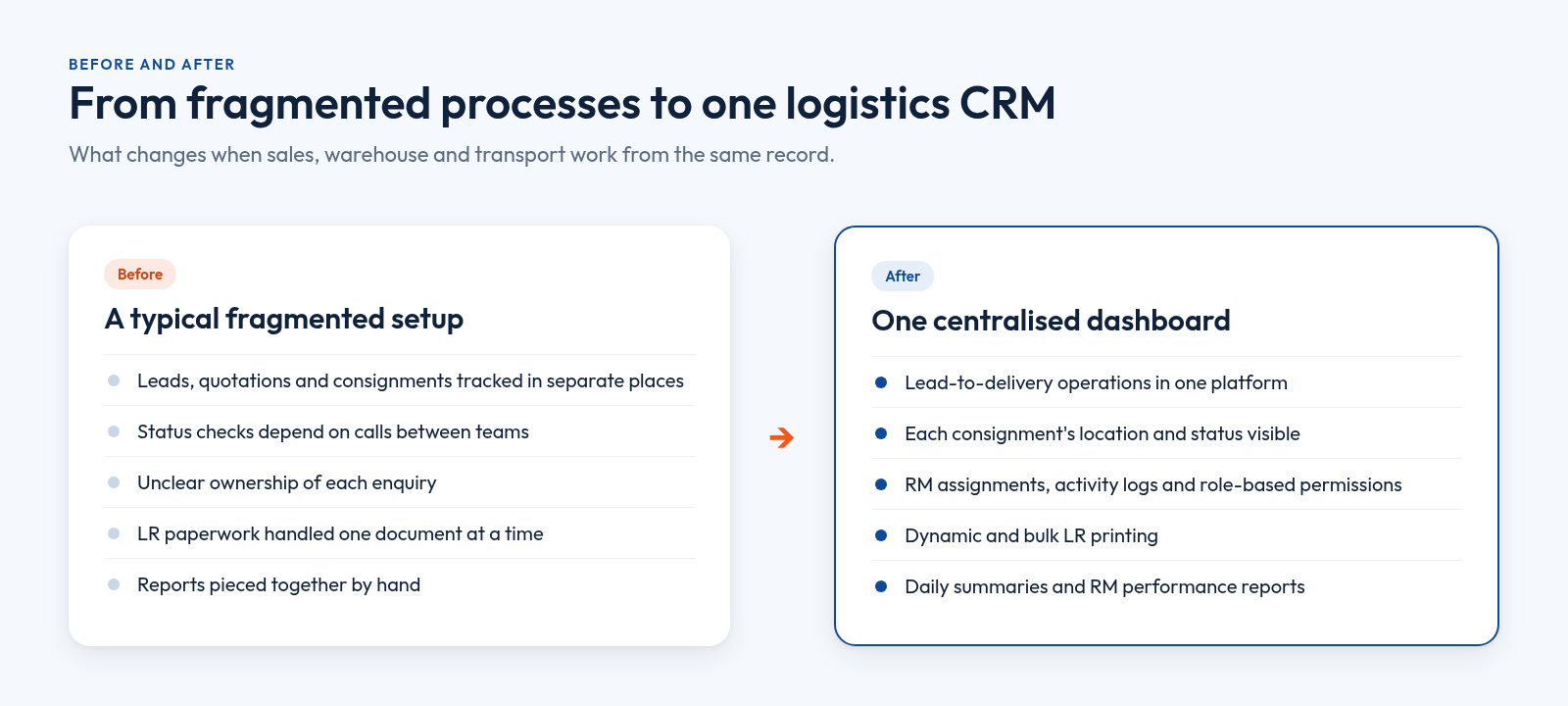
The stated goal was to replace fragmented operational processes with one secure dashboard that gives clear ownership, live movement visibility and role-specific access.
The hard requirement: one permanent LR number
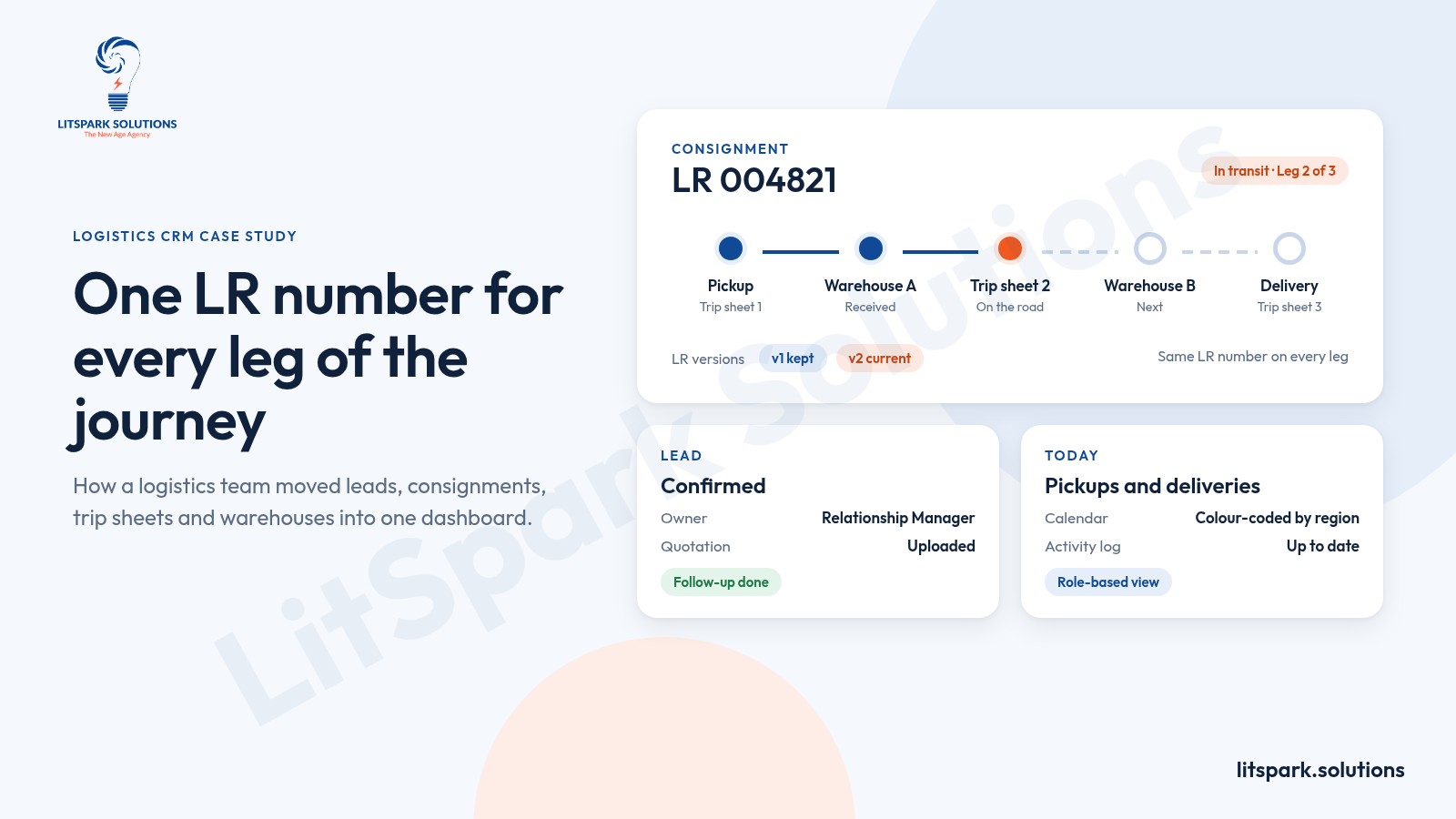
One requirement shaped the whole design. A consignment can travel through several trips and warehouses, and its permanent LR number must not change along the way. The system also had to keep a complete operational history for every consignment.
Design rule: Decide what must never change (here, the LR number) before you design anything else. Every screen, report and printout depends on that one stable reference.
What went into the logistics CRM
The result, called the GoSmart Dashboard, is a responsive logistics management platform with dedicated workflows for leads, confirmed leads, consignments and trip sheets.
From enquiry to confirmed lead
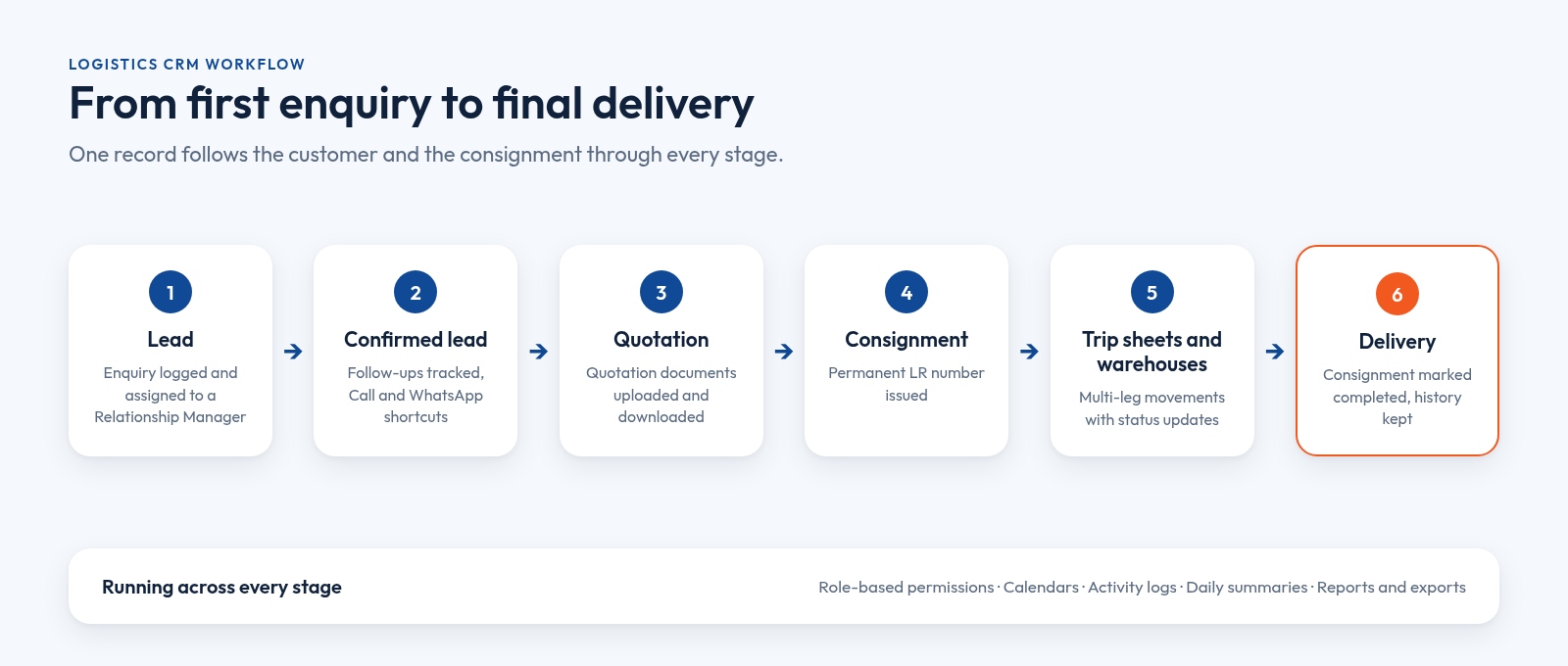
Sales work starts with lead and confirmed-lead management. Each lead can be assigned to a Relationship Manager (RM), follow-ups are tracked, and quotation documents can be uploaded and downloaded against the record. Call and WhatsApp shortcuts sit inside the workflow, so staff can contact a customer without copying numbers into another app.
Consignment tracking across multi-leg movements
This is where the custom logistics CRM differs most from an off-the-shelf tool. A movement-based model lets the same consignment travel through multiple trip sheets without creating a new LR number. Dynamic LR generation uses the latest movement leg, while earlier LR versions are kept for reference. Bulk LR printing handles the paperwork side.
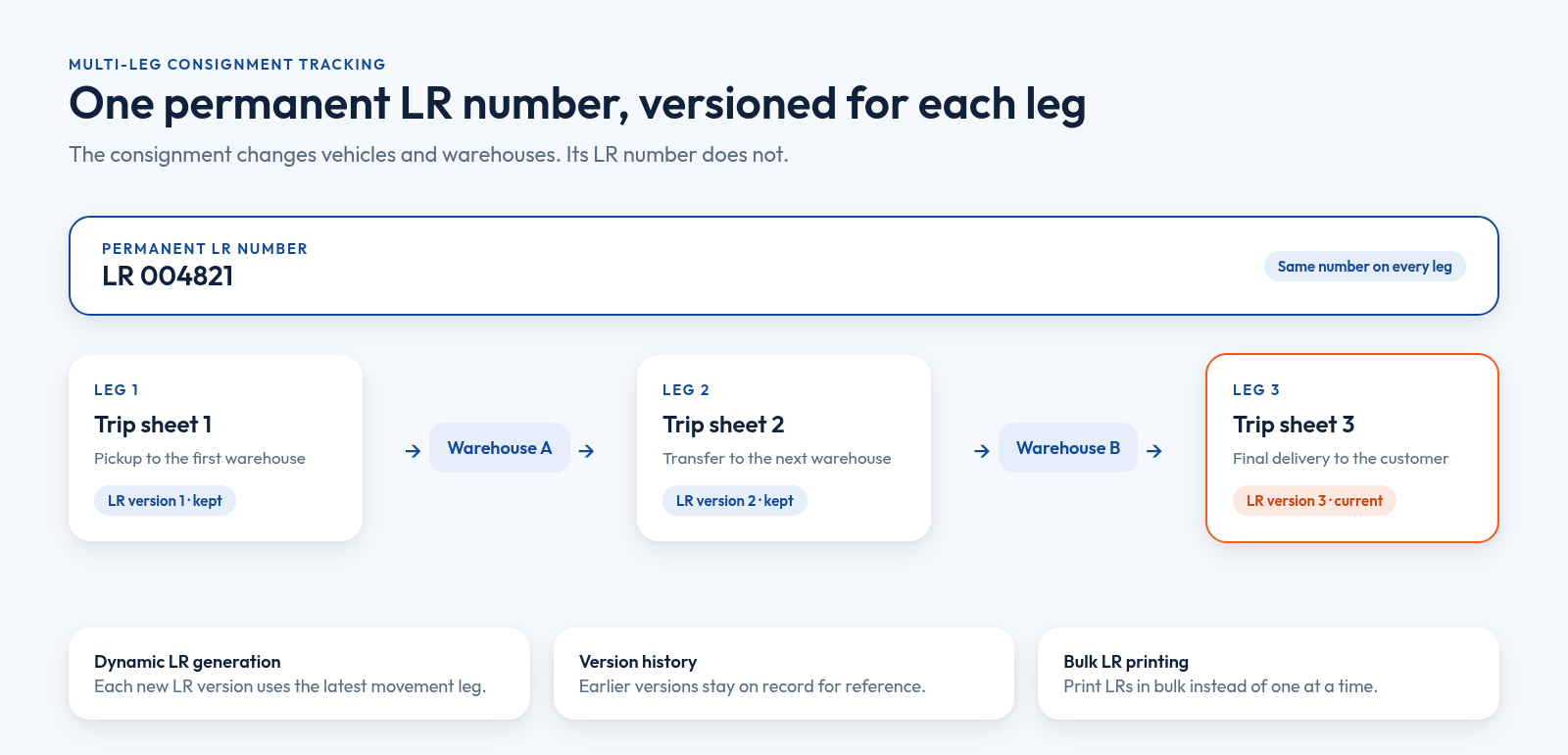
The consignment tracking system also covers:
- Active and completed consignment management
- Consignment-level status updates
- Trip sheet management
- Warehouse and delivery associate management
- Configurable LR numbering and document uploads
Roles, calendars and daily reporting
Role-based permissions give appropriate access to Super Admins, Supervisors, Relationship Managers, Warehouse Managers and operational users. Pickup, delivery and follow-up calendars use region-based colour coding. Advanced filtering, customer search and infinite-scroll pagination help teams find records fast, while RM performance reporting, daily summaries, data exports, and activity logs with audit history support day-to-day review.
| Team | What the platform gives them |
|---|---|
| Sales and RMs | Lead and confirmed-lead management, RM assignment, follow-up tracking, quotation uploads, Call and WhatsApp shortcuts |
| Operations | Consignments, trip sheet management, multi-leg movements, consignment-level status updates |
| Warehouse | Warehouse movements, warehouse and delivery associate management |
| Admin and supervisors | Role-based permissions, configurable LR numbering, master data, activity logs and audit history |
| Management | RM performance reporting, daily summaries, data exports |
The results
The published case study lists the outcomes below. We have kept them as stated, without adding numbers that are not on the page.
| Area | What changed |
|---|---|
| Operations | Lead-to-delivery operations centralised in one platform |
| LR numbers | Permanent LR numbers preserved across multi-leg movements |
| Visibility | Better visibility into each consignment's current location and status |
| Coordination | Less manual coordination between sales, warehouse and transport teams |
| Customer contact | Faster customer communication through Call and WhatsApp actions |
| Accountability | Assignments, activity logs and role-based permissions |
| Documents | Simpler document generation through dynamic and bulk LR printing |
| Reporting | Operational reporting and daily RM performance easier to review |
Timeline and tech stack
The build took 3 months from kickoff to launch, with working software shown every week. It was delivered as web, mobile and custom development, with cloud and DevOps support. LitSpark's development team used this stack:
- Front end: React 19, JavaScript, Tailwind CSS, Radix UI, React Router, Axios and Recharts
- Back end: Python, FastAPI and Pydantic, with a REST API
- Data and security: MongoDB and JWT authentication
- Deployment: Docker
Weekly working software matters more than the stack. Operations staff can test real screens early, and small changes, such as a new filter or a status, land before launch rather than after it.
Lessons for teams planning a logistics CRM
You do not need City Connect's exact feature list. You do need the same clarity about how goods and responsibility move through your business. Before you brief anyone, work through this list:
- Map the journey first. Write down every step from enquiry to delivery, and who owns each one.
- Name your permanent identifiers. LR numbers, consignment IDs and customer codes should stay stable even when vehicles and warehouses change. Good database architecture design starts here.
- Model movements, not just shipments. If one consignment can take several legs, the data model must allow it from day one.
- Define roles early. List who should see, edit and approve what. Retro-fitting permissions is painful.
- Plan the daily view. Decide which calendars, summaries and reports supervisors will check every morning.
- Keep an audit trail. Activity logs settle "who changed this?" questions quickly.
Practical tip: If your team still phones the warehouse to confirm where a consignment is, start there. Visibility is usually the first and clearest win.
When a custom logistics CRM makes sense
An off-the-shelf tool is often enough if you run simple point-to-point deliveries. A custom build earns its place when your process has rules a packaged product cannot hold, such as multi-leg movements, versioned LR documents or region-based scheduling. If your current setup leans on manual hand-offs, our earlier piece on why companies should automate manual workflows before they scale is a useful next read. For order-heavy businesses, the order management system guide covers the retail side of the same problem.
If you are weighing a build, look at teams that offer ERP and CRM development with real logistics work in their portfolio, and ask to see screens, not just slides. Later, the same data can feed workflow automation, such as automatic status messages.
Frequently asked questions
What is a logistics CRM?
A logistics CRM is a customer relationship management system built around how goods move, not only around sales deals. Alongside leads, follow-ups and quotations, it tracks consignments, trip sheets, warehouses and delivery staff, so sales and operations work from the same live record instead of separate spreadsheets, registers and chat groups.
How is a logistics CRM different from a regular CRM?
A regular CRM tracks contacts, deals and sales stages. A logistics CRM adds operational records: consignments, LR documents, multi-leg movements, warehouse transfers, pickup and delivery calendars, and role-based access for warehouse and transport staff. That lets one system cover the journey from first enquiry to final delivery, with a full audit history.
What is LR generation in logistics software?
LR stands for lorry receipt, the document issued when goods are handed to a transporter. LR generation means the software creates and numbers these documents automatically. In City Connect's platform, the permanent LR number stays the same across legs, while dynamic LR versions reflect the latest movement and earlier versions stay on record.
How long does it take to build a custom logistics CRM?
It depends on scope, integrations and the number of user roles. City Connect's platform, covering leads, quotations, consignments, multi-leg trip sheets, warehouses, calendars and reporting, took 3 months from kickoff to launch, with working software shown every week. A smaller first release focused on one workflow can be shorter.
Keep Reading.
- Database Architecture Design: Master Modern Concepts
- Why Companies in 2026 Should Automate Manual Workflows Before They Scale
- Order Management System Ecommerce: The Complete 2026 Guide
Want Help Putting This Into Practice?
Tell us what you're working on. We'll reply within 24 hours with next steps.
See Development for how we scope custom platforms, or read the full City Connect CRM portfolio page. Email business@litspark.solutions, or book a discovery call.
Written By
LitSpark Solutions Team
We build websites, apps and AI automations, and run marketing for growing businesses from Bengaluru. These guides come from that work. About us