MVP Checklist: What Your MVP Should Actually Include
Use this MVP checklist to decide what to include in an MVP: the seven must-haves, what to cut, how to prioritise features and what to check before launch.

LitSpark Solutions Team
On This Page22 sections
- Table of Contents
- What an MVP is (and what it is not)
- The MVP checklist: seven things every MVP needs
- 1. One core user flow
- 2. Simple access
- 3. A way to pay or commit
- 4. Trust basics
- 5. Measurement from day one
- 6. A feedback loop
- 7. Mobile readiness
- What to leave off your MVP checklist for now
- Do it by hand first
- How to prioritise MVP features
- The four-question test
- Your pre-launch MVP checklist
- Frequently asked questions
- What should be included in an MVP?
- How many features should an MVP have?
- What is the difference between an MVP and a prototype?
- How do you prioritise features for an MVP?
- Keep Reading.
- Want Help Putting This Into Practice?
Most founders do not fail because they build too little. They fail because they build the wrong things, or too many of them, before a single real user has tried the product. An MVP checklist fixes that by forcing one hard question for every feature: does this help a specific user reach a specific result, or help us learn whether the idea works? This guide gives you a practical MVP checklist covering what to include in an MVP, what to cut, and how to decide when a feature is "must-have" or just nice to have.
The stakes are real. In CB Insights' analysis of 431 VC-backed startups that shut down since 2023, poor product-market fit was the leading root cause, cited in 43% of cases. An MVP exists to find out whether you have that fit before you spend months building around a guess.
Table of Contents
- What an MVP is (and what it is not)
- The MVP checklist: seven things every MVP needs
- What to leave off your MVP checklist for now
- How to prioritise MVP features
- Your pre-launch MVP checklist
- Frequently asked questions
What an MVP is (and what it is not)
A minimum viable product is the smallest working version of your idea that real users can use to reach a real outcome. "Minimum" refers to scope, not quality. "Viable" means it actually works for the person using it.
It helps to be clear about what an MVP is not:
- Not a prototype. A clickable prototype shows how something might work. An MVP does the work, even if parts of it run manually behind the scenes.
- Not version one of your full roadmap. It is a test of your riskiest assumption, not a smaller copy of the final product.
- Not a demo for investors. If nobody outside your team can use it end to end, it is a demo.
The goal is evidence. Every item on your MVP checklist should either deliver the core result or help you measure whether users want it.
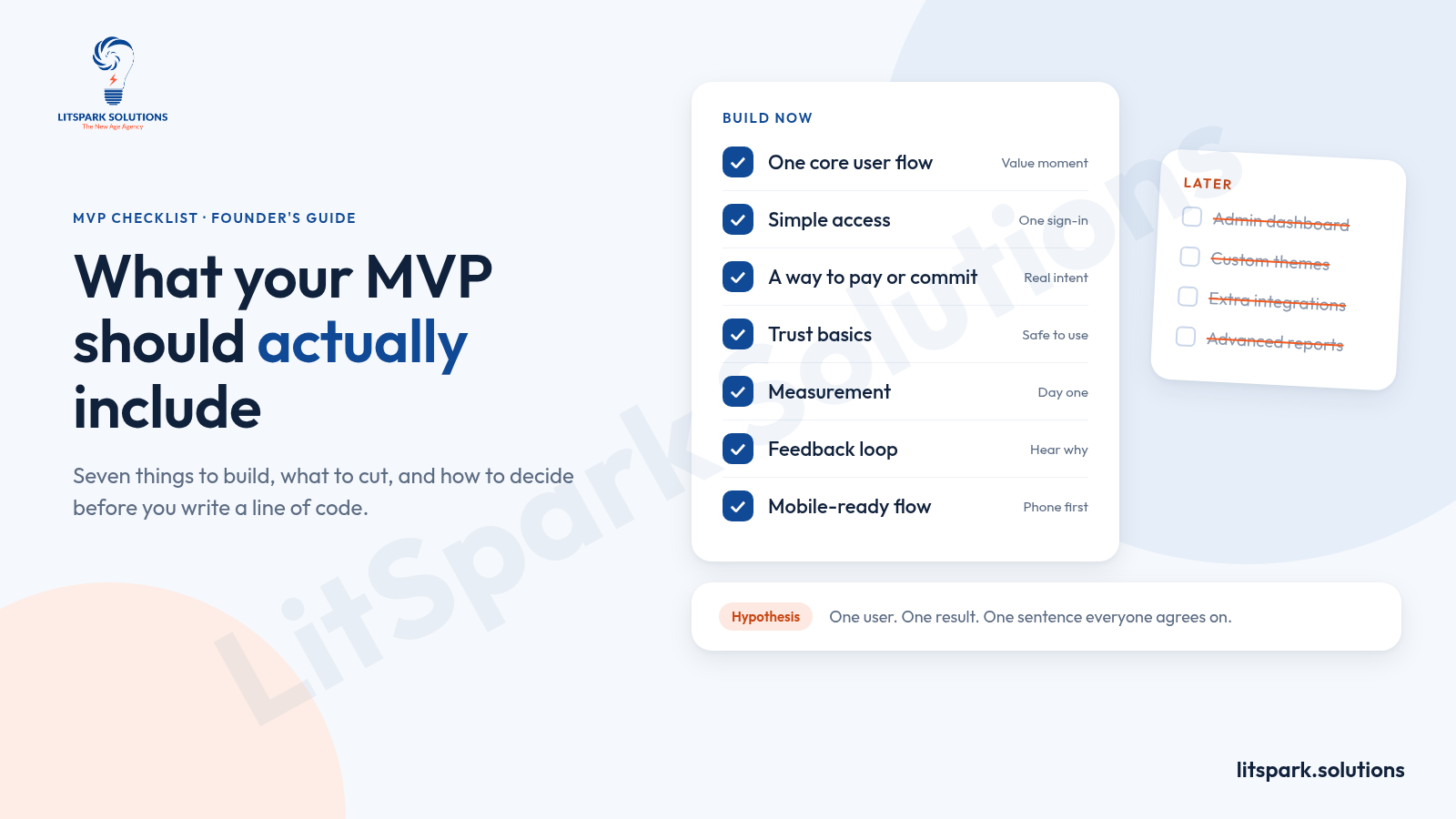
Founder rule: Write your MVP hypothesis in one sentence before you list a single feature. For example: "Clinic managers will book patient follow-ups through a shared calendar instead of phone calls." Every feature must serve that sentence.
The MVP checklist: seven things every MVP needs
Here is the core MVP checklist we use as a starting point, framed around what to include in an MVP and the minimum version of each item. Not every product needs every item at the same depth, but skipping any of them should be a deliberate choice.
| Area | What to include | Minimum version |
|---|---|---|
| Core user flow | The path from first visit to the value moment | The fewest steps that deliver the result once |
| Access | A way in and a way back | One sign-in method, such as email or a magic link |
| Commitment | Proof that interest is real | A payment link, pre-order, booking or signed pilot |
| Trust basics | Enough safety for a real person to proceed | HTTPS, password reset, privacy policy, terms, backups |
| Measurement | Data on who reaches the value moment | Event tracking on sign-up, core action and return visits |
| Feedback loop | A way to hear why users stay or leave | An in-app feedback link and a way to book calls |
| Mobile readiness | A layout that works on phones | Responsive screens for the core flow |
1. One core user flow
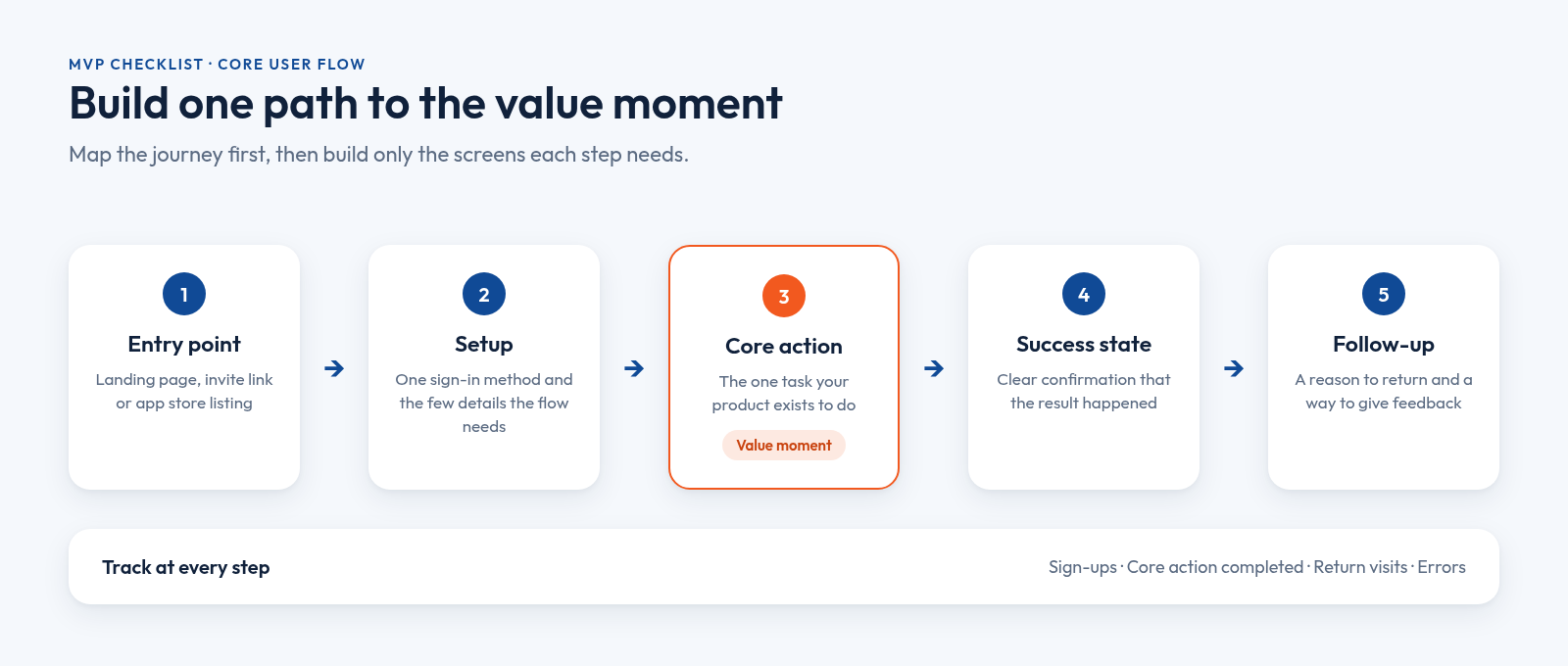
Pick one user and one result. A booking app needs a user to find a slot and book it. A B2B reporting tool needs a user to connect data and see one useful report. Map that journey as entry point, setup, core action, success state and follow-up, then build only the screens each step needs.
2. Simple access
Users need a way in and a way back. One sign-in method is usually enough at launch. Social logins, team invitations and role management can wait unless your hypothesis depends on them.
3. A way to pay or commit
Sign-ups are cheap. Commitment is evidence. Include the lightest step that proves intent: a checkout link, a deposit, a booking, or a signed pilot agreement for B2B products.
4. Trust basics
Minimal does not mean careless. If users share personal details, money or business data, they need secure connections, clear error messages, password reset, a privacy policy and terms of use. Automatic database backups protect you from losing the very data you are trying to learn from.
5. Measurement from day one
You cannot learn from an MVP you cannot measure. Track three things at minimum: who signs up, who completes the core action, and who comes back. Add error logging so bugs do not quietly push users away.
6. A feedback loop
Numbers tell you where people drop off. Conversations tell you why. A visible feedback link and an easy way to book a short call will teach you more in the first month than any dashboard.
Small samples go a long way here. Nielsen Norman Group's research on usability testing found that a study with five participants surfaces about 85% of usability problems, so a handful of early sessions is worth running before and after launch.
7. Mobile readiness
Assume your first user is on a phone. StatCounter reports that mobile devices accounted for 59.9% of worldwide web traffic in October 2026, and 84.21% in India. Your core flow should work cleanly on a small screen, even if admin screens stay desktop-only for now. Our UI/UX design principles guide covers the layout basics that make a small screen feel easy.
What to leave off your MVP checklist for now
Most scope creep comes from features that feel essential in a planning meeting but are not on the path to the value moment. The data backs this up: Pendo's Feature Adoption Report found that 80% of features in the average software product are rarely or never used, while about 12% of features generate 80% of daily usage.
| Feature | Include in the MVP? | Why |
|---|---|---|
| Admin dashboard | Usually not | Manage early users with a spreadsheet or the database directly |
| Advanced analytics and reports | No | Basic event tracking answers the questions that matter now |
| Multiple sign-in options | No | One method is enough to test demand |
| Third-party integrations | Only if core | Add them when users ask, unless the product is the integration |
| Notifications and reminders | Sometimes | Include only if the core flow fails without them |
| Custom branding and themes | No | Clean, consistent design is enough for launch |
| Native apps on both platforms | Rarely | A responsive web app or one cross-platform app usually tests the idea faster |
Do it by hand first
Many features can run manually for your first users. You can email reports, approve accounts yourself, match buyers and sellers in a spreadsheet, or onboard people on a call. Manual work is slow, but it is flexible, and it shows you exactly which steps are worth automating later. Anything you can handle this way comes off the MVP checklist for now.
Practical tip: Keep a "not in this version" list and share it with everyone on the project. It turns every "can we also add..." conversation into a quick decision instead of a debate.
How to prioritise MVP features
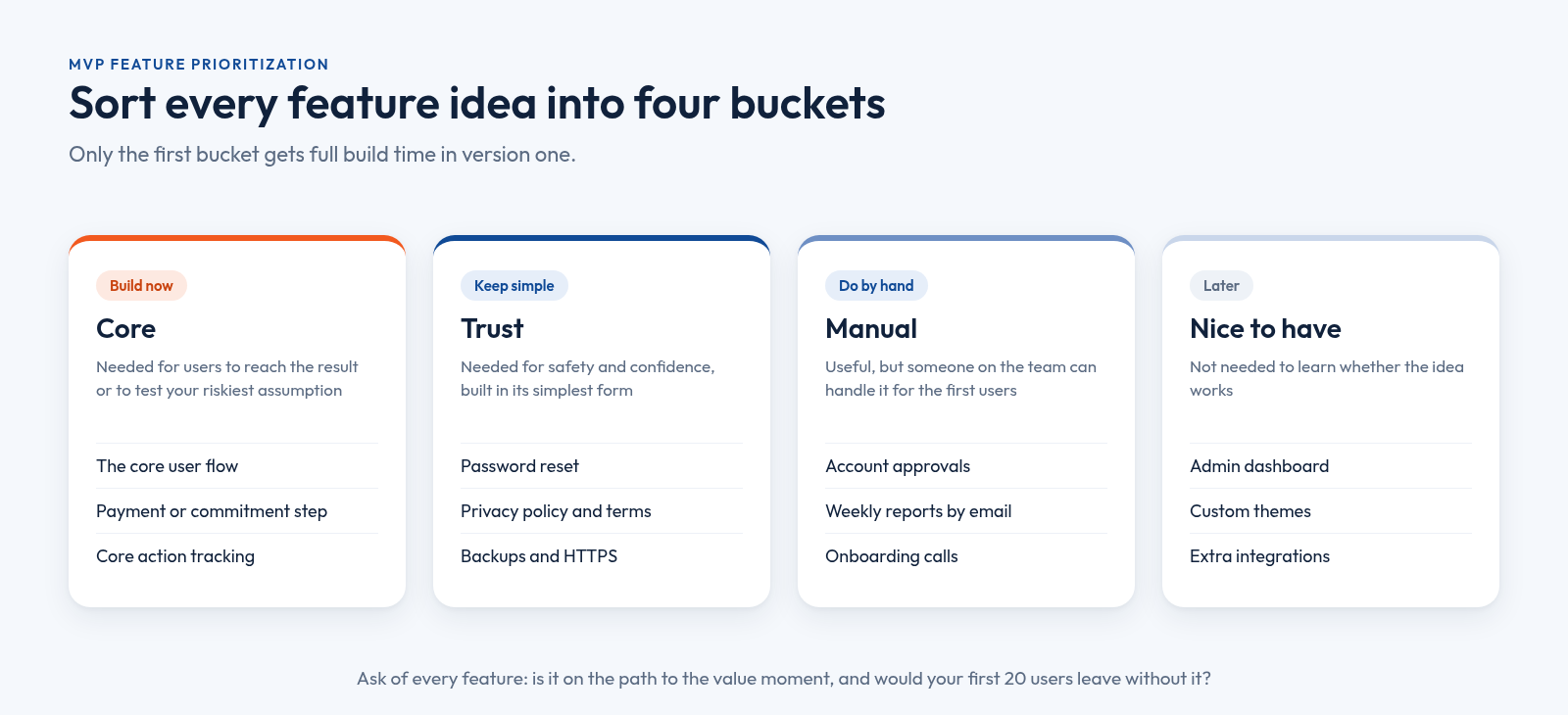
When the feature list grows, a good MVP features checklist needs a sorting rule. Put every item into one of four buckets. This simple form of MVP feature prioritization keeps the first release small without making it feel unfinished.
The four-question test
For each feature, ask:
- Is it on the path to the value moment? If users can get the result without it, it is a candidate to cut.
- Does it help test the riskiest assumption? If you would learn the same thing without it, cut it.
- Would your first 20 users leave without it? Not "would they like it", but would they actually leave.
- Can someone do it by hand for now? If yes, do it manually and revisit after launch.
Keep features that pass question 1 or 3 and fail question 4. Move everything else to "do by hand" or "later".
When we scope MVPs at LitSpark, this is the step that saves the most time: founders usually arrive with a long feature list and leave with one flow they can launch and test quickly. If you are working with an outside team, our guide to outsourced product development services explains how to brief a partner so scope stays tight.
Your pre-launch MVP checklist
Before you open the doors, run through this final MVP launch checklist. Treat it as the last section of your MVP checklist, not an optional extra:
- Hypothesis written down. One sentence, agreed by everyone on the team.
- Core flow tested end to end on a phone and a laptop, by someone who did not build it.
- Tracking verified. Sign-up, core action and return visits show up correctly.
- Trust basics live. HTTPS, password reset, privacy policy, terms and backups.
- Feedback channel visible inside the product.
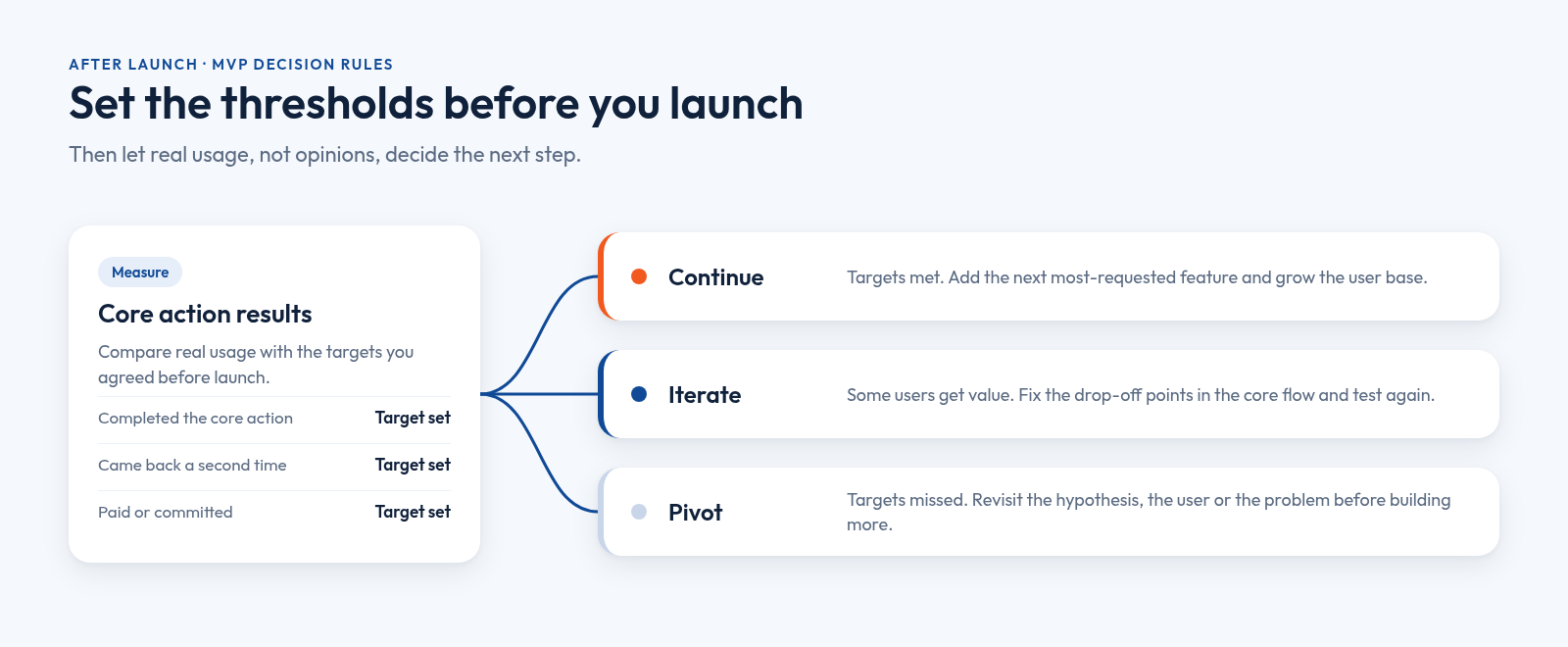
- Success and failure thresholds set. Decide in advance what result means continue, iterate or pivot.
- First users lined up. A waitlist, a pilot customer or a community you can invite on day one.
Launching is the start of the learning, not the end of the project. Revisit your MVP checklist after each round of feedback, because what counts as must-have will change once real users arrive. Plan how you will reach those first users, too; our digital marketing for startups guide covers practical early-traction channels.
Frequently asked questions
What should be included in an MVP?
An MVP should include one core user flow that delivers a real result, a simple way to sign in, a way for users to pay or commit, basic trust features like password reset and a privacy policy, analytics on the core action, and a feedback channel. Everything else can wait until real usage shows what matters.
How many features should an MVP have?
There is no fixed number. An MVP should have only the features needed for one type of user to complete one core task and for you to measure the result. For many products, that means a handful of screens built around a single workflow, plus the basics for access, trust and tracking.
What is the difference between an MVP and a prototype?
A prototype shows how a product might look and work, often as clickable screens with no real data behind them. An MVP is working software that real users can use to reach a real outcome. Prototypes test usability and ideas; an MVP tests whether people actually want and use the product.
How do you prioritise features for an MVP?
Sort every feature into four buckets: build now, keep simple, do by hand, and later. Build a feature now only if it sits on the path to the core result or tests your riskiest assumption. If someone can handle it manually for the first users, do that and automate it after launch.
Keep Reading.
- Outsourced Product Development Services: 2026 Partner Guide
- UI/UX Design Principles Your Business Needs to Grow
- React Native App Development: A Complete Business Guide
Want Help Putting This Into Practice?
Tell us what you're working on. We'll reply within 24 hours with next steps.
See how we scope and launch a single-flow MVP, explore our UI/UX and product design services, or read about our custom web and mobile app development. Email business@litspark.solutions, or book a discovery call.
- MVP checklist
- What to include in an MVP
- MVP features checklist
- MVP feature prioritization
- Startup guide
Written By
LitSpark Solutions Team
We build websites, apps and AI automations, and run marketing for growing businesses from Bengaluru. These guides come from that work. About us