AI Overviews SEO: What Small Businesses Should Do in 2026
AI Overviews SEO for small businesses: what the 2026 click data shows, how to rank in Google AI Overviews, which myths to skip and a clear 90-day plan

LitSpark Solutions Team
On This Page27 sections
- Table of Contents
- What AI Overviews changed in Search in 2026
- AI Overviews vs AI Mode
- Which searches trigger an AI Overview
- AI Overviews impact on clicks: what the data says
- Being cited is worth a lot, but it is not a full recovery
- Two real examples: Chegg and the Daily Mail
- Chegg: homework answers, answered by Google
- The Daily Mail: ranking well, clicked rarely
- How to rank in Google AI Overviews without chasing hacks
- Make sure you are eligible first
- Write answer-first, then go deeper
- Publish what only you can say
- Cover the follow-up questions
- Keep your local and product data clean
- What to skip: AI Overviews SEO myths
- How to measure AI Overviews in Search Console
- Use the Generative AI performance report
- Track clicks and impressions separately
- A 90-day AI Overviews SEO plan for small businesses
- Frequently asked questions
- What is AI Overviews SEO?
- How do I rank in Google AI Overviews?
- Do AI Overviews reduce website traffic?
- What is the difference between AI Overviews and AI Mode?
- Keep Reading.
- Want Help Putting This Into Practice?
AI Overviews SEO is no longer a side project for big publishers. If your customers search Google for answers before they call, book or buy, there is a good chance an AI-written summary now sits above your page. Google says AI Overviews have more than 2.5 billion monthly users, and its conversational AI Mode passed 1 billion. For a small business, that changes which pages get clicked, which ones only get seen, and what "ranking" even means.
The good news: most of what works is still plain, good SEO. The bad news: the pages that win clicks now look different from the ones that won them in 2023. This guide covers what the click data really says, two real examples of the damage, how to rank in Google AI Overviews without chasing hacks, and a 90-day plan you can run with a small team.
Table of Contents
- What AI Overviews changed in Search in 2026
- AI Overviews impact on clicks: what the data says
- Two real examples: Chegg and the Daily Mail
- How to rank in Google AI Overviews without chasing hacks
- What to skip: AI Overviews SEO myths
- How to measure AI Overviews in Search Console
- A 90-day AI Overviews SEO plan for small businesses
- Frequently asked questions
What AI Overviews changed in Search in 2026
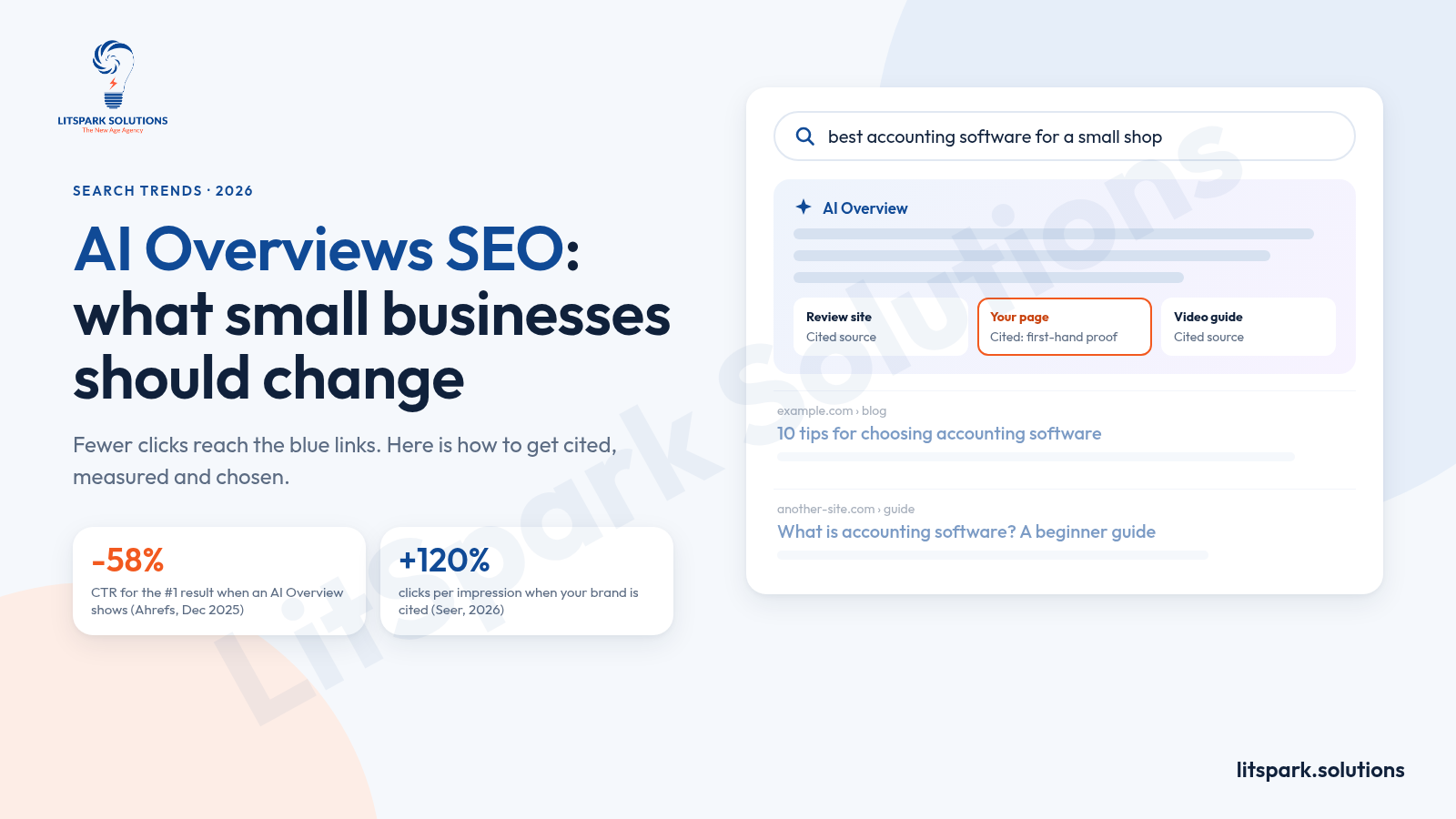
An AI Overview is the generated answer Google shows at the top of some results pages, with a few cited links beside or inside it. In its own guide to optimizing for generative AI features, Google explains that these answers are grounded in its normal Search index and ranking systems. It also uses "query fan-out": the model fires off several related searches behind the scenes and pulls sources from all of them.
That second point matters more than it sounds. Your page can be cited for a question it never ranked for, because it answered one of the hidden follow-up questions well.
AI Overviews vs AI Mode
The two features are related but not the same, and in mid-2026 Google said it had brought them together into one Search experience.
- AI Overviews appear inside the normal results page for some searches, usually informational ones, and the blue links still sit below.
- AI Mode is a full conversational view. People ask follow-up questions, and links appear as supporting sources rather than as a ranked list.
- The same rules apply to both. Google says a page only needs to be indexed and eligible to show with a snippet. There is no separate technical requirement.
Which searches trigger an AI Overview
Not every search gets one. Across 146 million results pages, Ahrefs found AI Overviews on about 21% of keywords in September 2025, rising to 57.9% for question-style queries and 46% for queries of seven words or more. Seer Interactive's 2026 study of 53 brands saw much higher rates on certain query types in its tracked set: 95.4% for comparison ("X vs Y") searches, 85.9% for questions and 83.4% for price or "buy" searches.
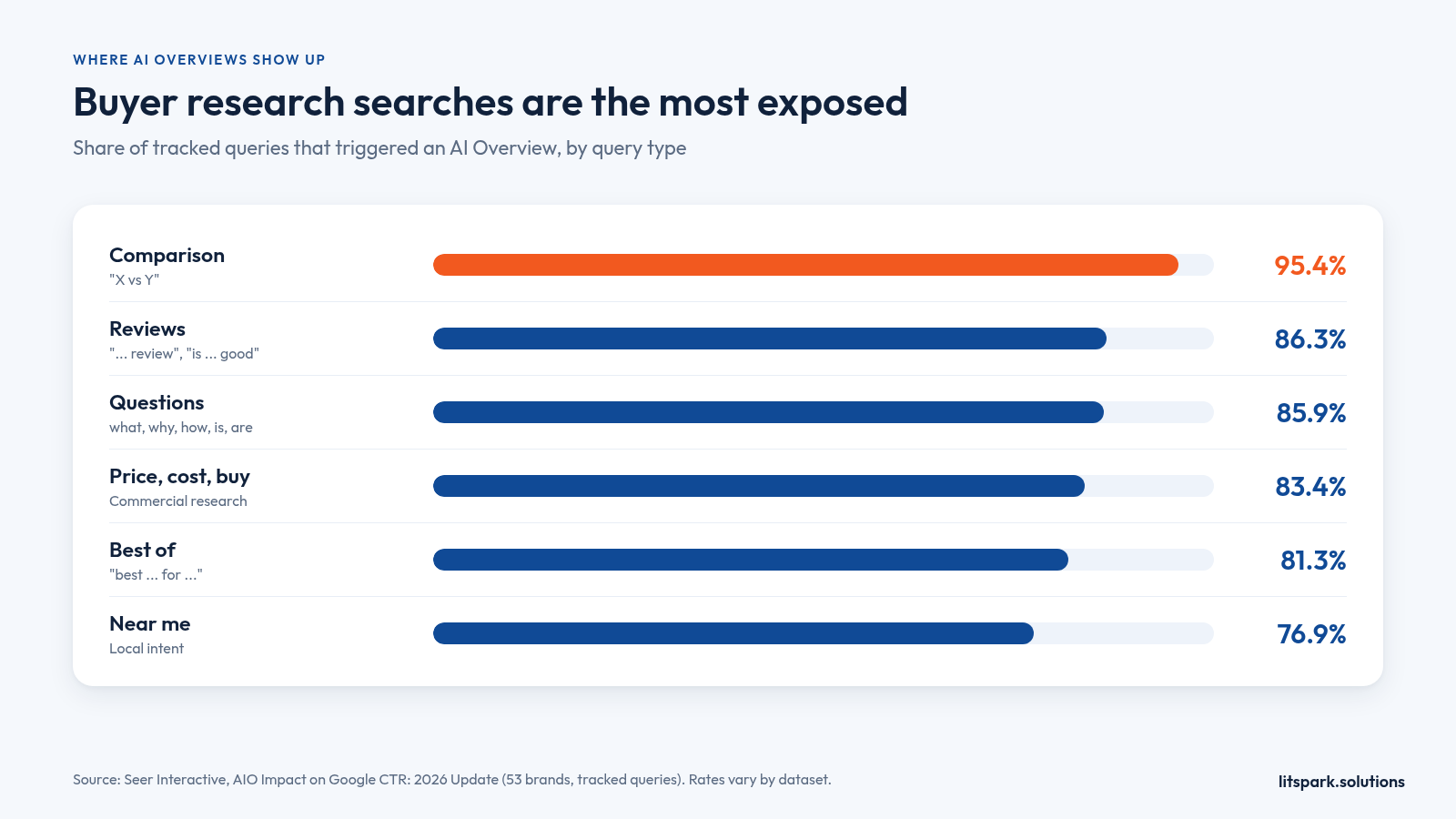
Put simply: the questions your buyers ask while they are still deciding are the ones most likely to be answered by Google before they reach you.
AI Overviews impact on clicks: what the data says
Every serious study points the same way. When an AI Overview appears, fewer people click through to websites. How much fewer depends on who measured it and when.
| Study | What was measured | Key finding |
|---|---|---|
| Pew Research Center (July 2025) | Browsing data from 900 US adults, March 2025 | People clicked a result in 8% of visits with an AI summary vs 15% without; only 1% clicked a link inside the summary |
| Ahrefs (December 2025 data) | 300,000 keywords, desktop Search Console CTR | An AI Overview correlated with 58% lower clickthrough rate for the top-ranking page |
| Seer Interactive (April 2026) | 53 brands, 5.47M queries, 2.43B impressions | Organic CTR on AI Overview queries fell to 1.3% in December 2025, then recovered to 2.4% by February 2026 |
| DMG Media to the UK CMA (2025) | Daily Mail rankings tracked by Authoritas | UK desktop CTR fell from 25.23% to 2.79% when an AI Overview appeared, a drop of 89% |
Google disputes the scale. When Pew published its numbers, Google told Ars Technica the study used "a flawed methodology" and that it had not seen significant drops in aggregate web traffic. Both things can be true: total clicks across the web can hold up while your specific informational pages lose a large share of theirs.
Being cited is worth a lot, but it is not a full recovery
Seer's data contains the most useful number for anyone planning their AI Overviews SEO strategy. On informational queries, brands cited inside the AI Overview earned about 120% more organic clicks per impression than brands left out. Their full-year average CTR was 2.07%, against 0.94% for uncited brands. Results pages with no AI Overview still averaged 3.35%.
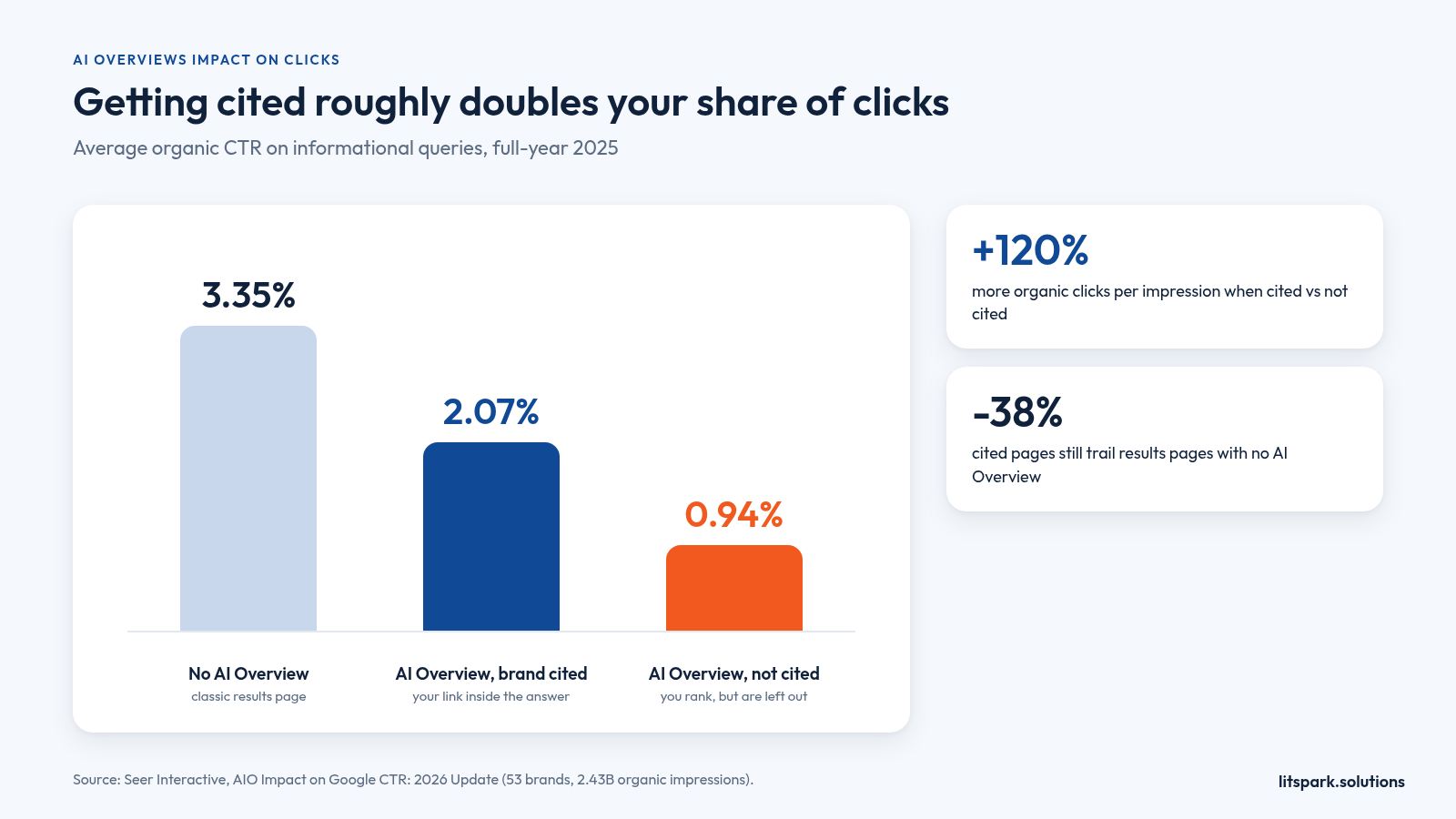
The takeaway: You cannot opt back into 2023 click rates. But on the searches where an AI Overview appears, being one of the cited sources roughly doubles your share of the clicks that are left. That is the gap worth fighting for.
Two real examples: Chegg and the Daily Mail
Big publishers felt this first because they depend on informational traffic. Their numbers show what is at stake for any business whose website answers questions for free.
Chegg: homework answers, answered by Google
The online learning company Chegg told investors in its February 2025 results that non-subscriber traffic was down 49% year on year in January 2025, compared with an 8% decline it had reported for Q2 2024. It blamed AI Overviews for keeping students on Google, and it filed an antitrust lawsuit against Google the same day. Whatever the court decides, the lesson for smaller sites is clear: if your page simply restates an answer, Google can now give that answer itself.
The Daily Mail: ranking well, clicked rarely
DMG Media, which publishes the Daily Mail, gave the UK's Competition and Markets Authority its own tracking data in 2025. In the UK, desktop CTR fell from 25.23% for a top-ten ranking with no AI Overview to 2.79% when an AI Overview appeared, even with a visible Daily Mail link. Mobile was down 87%. Ranking was not the problem. The click simply never happened.
What this means for a small business: Generic "what is X" posts are the most exposed pages on your site. Pages that show your own work, process, location and proof are much harder for a summary to replace, because the reader still needs you to act.
How to rank in Google AI Overviews without chasing hacks
There is no secret switch. Google states that its generative features run on its core ranking and quality systems, so good SEO is still the entry ticket. What changes is what "good" looks like on the page.
Make sure you are eligible first
Before rewriting anything, check the basics:
- Indexed and snippet-eligible. Pages blocked by
noindex,nosnippetor a robots rule cannot be cited. - Included in generative AI features. Search Console now has a Search generative AI control under Settings. Inclusion is the default, but confirm nobody switched it off.
- Crawlable content. If key text loads only after heavy JavaScript, follow Google's JavaScript SEO guidance or render it on the server.
- Fast and readable on mobile. Google's guide lists page experience as part of the same foundation.
Write answer-first, then go deeper
Open each important section with a direct, two to three sentence answer, then add the detail an expert would add. Use clear H2 and H3 headings phrased the way customers ask. This helps human readers skim and helps Google match your section to a fan-out question.
Publish what only you can say
Google's guide draws a line between "commodity content", such as generic tip lists anyone could write, and "non-commodity content" based on first-hand experience. For a small business, that means:
- Real project photos, before-and-after results and named case studies
- Your actual process, timelines and what you will not do
- Local details: service areas, opening hours, how bookings work
- Clear comparisons from someone who has used both options
Cover the follow-up questions
Ahrefs' 2026 citation study found that only about 38% of URLs cited in AI Overviews also appeared in the top 10 for that query, down from about 76% in its earlier analysis. Its explanation is fan-out: Google pulls sources from related searches. Build topic clusters that answer the next three questions a buyer would ask, linked from one strong pillar page.
Keep your local and product data clean
Google's guide says AI responses can include local business and product details, and points to Google Business Profile and Merchant Center feeds. Keep hours, categories, services, photos and reviews current. For many local businesses, this is the fastest AI Overviews SEO win available.
What to skip: AI Overviews SEO myths
A whole industry of "AEO" and "GEO" tactics has grown up around AI search. Google's own guidance says optimizing for generative AI search "is still SEO", and lists several things you can ignore for Google Search.
| Common advice | What Google says | What to do instead |
|---|---|---|
| Add an llms.txt file | Google Search does not use it; it neither helps nor harms | Spend the time on a page buyers actually need |
| "Chunk" content into tiny pieces | Not required; Google can find the relevant part of a long page | Use clear headings and short paragraphs for readers |
| Add special AI schema markup | No special markup is needed for AI features | Keep normal structured data for rich results |
| Create a page for every query variation | Doing it to manipulate results can breach the scaled content abuse policy | One strong page per real topic, updated often |
| Buy mentions across forums and blogs | Inauthentic mentions are not as helpful as they seem | Earn real reviews, press and partner links |
If a vendor's pitch rests mainly on the left-hand column, ask what changes on your actual pages.
How to measure AI Overviews in Search Console
For a long time, nobody could see AI Overview performance separately. That changed in 2026.
Use the Generative AI performance report
Google says the Generative AI performance report has been available to all websites worldwide since 31 August 2026. It shows how often links to your site appeared in AI Overviews and AI Mode, broken down by page, country, device and date. If you see no report, your site may not have enough impressions yet, or it may be excluded.
Track clicks and impressions separately
Seer found that one brand-cited segment's CTR halved between September and October 2025 while clicks stayed flat, because impressions more than doubled. A falling CTR can mean you earned more citations, not fewer visits. Watch three numbers each month:
- Impressions in AI features (from the generative AI report)
- Organic clicks to the same pages (from the standard performance report)
- Leads or sales those pages produced (from your analytics or CRM)
The third number is the one that pays the bills. A page that earns half the clicks but twice the enquiries is a win.
A 90-day AI Overviews SEO plan for small businesses
Here is a realistic sequence for a team with limited time. It mirrors how we run search work at LitSpark: fix tracking first, then pages, then report on leads rather than traffic.
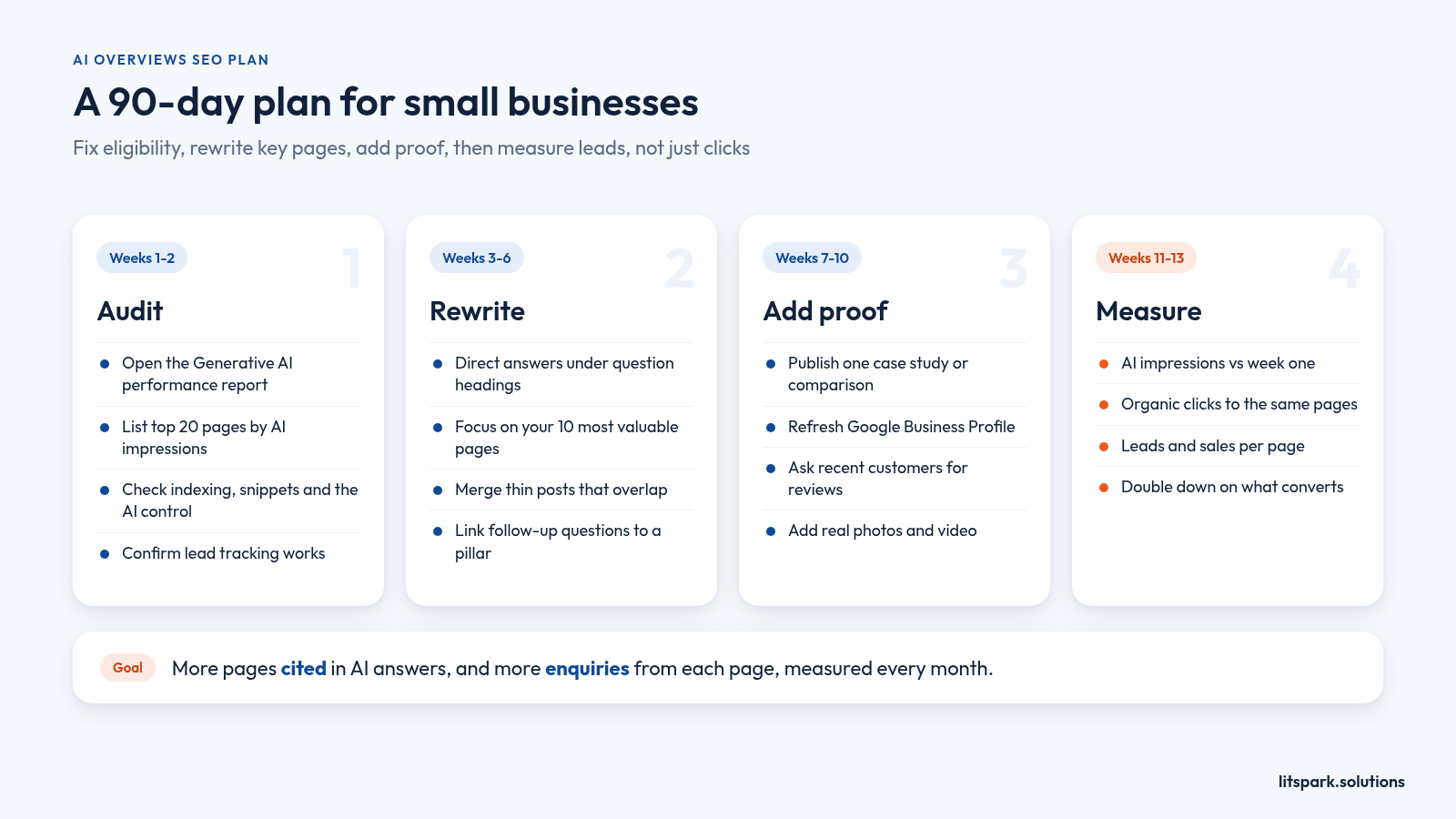
- Weeks 1-2: Audit. Open the generative AI report, list your top 20 pages by impressions, check the generative AI control, indexing and snippet settings, and confirm lead tracking works.
- Weeks 3-6: Rewrite. Add direct answers under question-style headings on your ten most valuable pages. Merge thin posts that say the same thing.
- Weeks 7-10: Add proof. Publish one case study or comparison from your own work, refresh Google Business Profile details and ask recent customers for reviews.
- Weeks 11-13: Measure. Compare AI impressions, clicks and leads against week one, then double down on the page types that produced enquiries.
If crawling, speed or template fixes need code changes, treat them as a website development task, not a content task. For the wider channel mix around search, our guides to digital marketing for SMEs and digital marketing for startups show how to set priorities with a small team.
Frequently asked questions
What is AI Overviews SEO?
AI Overviews SEO is the work of making your pages eligible, useful and trustworthy enough to be cited in Google's AI-generated answers. It uses normal SEO foundations, such as indexing, clear headings and helpful content, plus a focus on first-hand proof, follow-up questions and measuring AI impressions in Search Console's generative AI report.
How do I rank in Google AI Overviews?
Make sure the page is indexed, snippet-eligible and included in Search Console's generative AI control. Then answer the main question directly near the top, add detail and first-hand proof, and cover related follow-up questions on linked pages. Keep your Google Business Profile accurate. Google says no special markup or llms.txt file is needed.
Do AI Overviews reduce website traffic?
Usually, for informational searches. Pew found people clicked results in 8% of visits with an AI summary versus 15% without, and Ahrefs linked AI Overviews to 58% lower clickthrough for the top result in December 2025. Pages that are cited inside the overview keep far more clicks than pages left out.
What is the difference between AI Overviews and AI Mode?
AI Overviews are short generated answers shown above normal results for some searches, with links below. AI Mode is a separate conversational view where people ask follow-up questions and links appear as supporting sources. Google uses the same eligibility rules for both, and Search Console reports their impressions together in one generative AI report.
Keep Reading.
- Digital Marketing for SMEs: Your 90-Day Growth Playbook
- Digital Marketing for Business Growth: A Tactical Playbook
- Performance Marketing vs Digital Marketing: A Guide
Want Help Putting This Into Practice?
Tell us what you're working on. We'll reply within 24 hours with next steps.
Send us your website and the three searches you most want to win. We will check how those pages show up in Google and AI answers, and show how our digital marketing team would fix them and report the leads they bring. Email business@litspark.solutions, or book a discovery call.
- AI Overviews SEO
- how to rank in Google AI Overviews
- AI Overviews impact on clicks
- AI Overviews vs AI Mode
- AI overview SEO strategy
- Google AI Overviews for small businesses
- Trends
Written By
LitSpark Solutions Team
We build websites, apps and AI automations, and run marketing for growing businesses from Bengaluru. These guides come from that work. About us